> ## Documentation Index
> Fetch the complete documentation index at: https://docs.liquid.ai/llms.txt
> Use this file to discover all available pages before exploring further.
# Image Understanding with Vision Language Models
Browse the complete example on GitHub
This example demonstrates how to use **Vision Language Models (VLMs)** with LeapSDK on Android. VLMs combine image understanding with natural language processing, enabling your app to analyze images, answer questions about visual content, and generate detailed descriptions—all on-device.
Built with **Jetpack Compose** and the **Coil** image loading library, this example shows how to create a multimodal AI application that processes both images and text locally on Android devices.
## What's inside?
The VLMExample showcases cutting-edge multimodal AI capabilities:
* **Vision Language Models** - Analyze images and generate text descriptions
* **Image Input Processing** - Handle image selection from gallery or camera
* **Multimodal Understanding** - Combine visual and textual information
* **Jetpack Compose UI** - Modern, declarative UI for image display and results
* **Coil Integration** - Efficient image loading and rendering
* **On-device Inference** - Complete privacy with local VLM processing
* **Interactive Q\&A** - Ask questions about images and get contextual answers
This example demonstrates the **LFM2.5-VL-1.6B** model, a vision-language model that can understand and reason about visual content.
## What are Vision Language Models?
**Vision Language Models (VLMs)** are AI models that can process both images and text simultaneously, enabling them to:
* **Describe images** - Generate detailed captions of what's in a photo
* **Answer visual questions** - Respond to queries about image content ("What color is the car?")
* **Detect objects** - Identify and describe objects, people, and scenes
* **Read text in images** - Extract and interpret text from photos (OCR-like capabilities)
* **Understand context** - Grasp relationships between objects and spatial arrangements
* **Generate insights** - Provide analysis, suggestions, or interpretations of visual data
**Example use cases:**
* Accessibility tools that describe images for visually impaired users
* Product identification and information lookup
* Document analysis and data extraction
* Visual search and discovery
* Educational apps that explain diagrams and illustrations
* Real estate apps that describe property photos
* Medical imaging assistants for preliminary analysis
## Environment setup
Before running this example, ensure you have the following:
Download and install [Android Studio](https://developer.android.com/studio) (latest stable version recommended).
Make sure you have:
* Android SDK installed
* An Android device or emulator configured
* USB debugging enabled (for physical devices)
This example requires:
* **Minimum SDK**: API 31 (Android 12)
* **Target SDK**: API 36
* **Kotlin**: 2.3.0 or higher
**Hardware recommendations:**
* At least 4GB RAM (6GB+ recommended for better performance)
* Vision models are larger and more compute-intensive than text-only models
This example requires the **LFM2.5-VL-1.6B** vision language model bundle.
**Step 1: Obtain the model bundle**
The example uses **LFM2.5-VL-1.6B** from the [LEAP Model Library](https://leap.liquid.ai/models). The code below loads it via `LeapModelDownloader.loadModel(...)`, which fetches the GGUF + matching `mmproj` companion file from the registry on first launch and caches them on device. No manual ADB step is needed.
**Manual deployment (alternative).** If you'd rather sideload the files, push the GGUF and its `mmproj` companion via ADB and use `loadSimpleModel(model: ModelSource(...))` instead of `loadModel(...)`:
```bash theme={"theme":{"light":"github-light","dark":"github-dark"}}
adb shell mkdir -p /data/local/tmp/liquid/
adb push lfm2.5-vl-1.6b-q4_k_m.gguf /data/local/tmp/liquid/
adb push lfm2.5-vl-1.6b-mmproj.gguf /data/local/tmp/liquid/
```
Then pass both paths to `ModelSource(modelPath = ..., mmprojPath = ..., modelName = "LFM2.5-VL-1.6B", quantizationId = "Q4_K_M")` — see [Model Loading → Sideloaded files](/deployment/on-device/sdk/model-loading#sideloaded-files).
Add the required dependencies to your app-level `build.gradle.kts`:
```kotlin theme={"theme":{"light":"github-light","dark":"github-dark"}}
dependencies {
// LeapSDK for VLM processing (0.10.0+)
implementation("ai.liquid.leap:leap-sdk:0.10.7")
implementation("ai.liquid.leap:leap-model-downloader:0.10.7")
// Coil for image loading
implementation("io.coil-kt:coil-compose:2.5.0")
// Jetpack Compose
implementation(platform("androidx.compose:compose-bom:2024.01.00"))
implementation("androidx.compose.ui:ui")
implementation("androidx.compose.material3:material3")
implementation("androidx.compose.ui:ui-tooling-preview")
implementation("androidx.activity:activity-compose:1.8.2")
// Image picker
implementation("androidx.activity:activity-ktx:1.8.2")
// ViewModel
implementation("androidx.lifecycle:lifecycle-viewmodel-compose:2.7.0")
}
```
**About Coil:**
[Coil](https://coil-kt.github.io/coil/) is a Kotlin-first image loading library for Android that:
* Efficiently loads and caches images
* Integrates seamlessly with Jetpack Compose
* Handles image transformations and processing
* Provides modern coroutine-based APIs
## How to run it
Follow these steps to start analyzing images with VLMs:
1. **Clone the repository**
```bash theme={"theme":{"light":"github-light","dark":"github-dark"}}
git clone https://github.com/Liquid4All/LeapSDK-Examples.git
cd LeapSDK-Examples/Android/VLMExample
```
2. **Pick a deployment strategy**
* Default: let `LeapModelDownloader.loadModel(...)` fetch LFM2.5-VL-1.6B from the LEAP Model Library on first launch
* Optional manual push: see the **Model Bundle Setup** accordion above for the ADB sideload path
3. **Open in Android Studio**
* Launch Android Studio
* Select "Open an existing project"
* Navigate to the `VLMExample` folder and open it
4. **Verify model path**
* Check that the model path in your code matches the deployment location
* Update if you used a different path
5. **Run the app**
* Connect your Android device or start an emulator
* Click "Run" or press `Shift + F10`
* Select your target device
6. **Select an image**
* On first launch, the app will load the VLM model (this may take 10-30 seconds)
* Tap the "Select Image" button
* Choose an image from your device's gallery
* Alternatively, take a photo if camera integration is enabled
7. **Analyze the image**
* After selecting an image, it will be displayed in the app
* The VLM will automatically analyze the image
* View the generated description or ask questions about the image
* Try different prompts: "What's in this image?", "Describe the scene", "What colors do you see?"
**Performance Note**: Vision models are computationally intensive. First-time inference may take 5-15 seconds on mobile devices. Subsequent inferences on the same or similar images will be faster as the model stays loaded in memory.
## Understanding the architecture
### Image Selection Flow
The app uses Android's image picker to select photos:
```kotlin theme={"theme":{"light":"github-light","dark":"github-dark"}}
@Composable
fun VLMScreen(viewModel: VLMViewModel) {
val imagePickerLauncher = rememberLauncherForActivityResult(
contract = ActivityResultContracts.GetContent()
) { uri: Uri? ->
uri?.let { viewModel.processImage(it) }
}
Button(onClick = { imagePickerLauncher.launch("image/*") }) {
Text("Select Image")
}
}
```
### VLM Integration Pattern
Loading and using the vision language model:
```kotlin theme={"theme":{"light":"github-light","dark":"github-dark"}}
import ai.liquid.leap.GenerationOptions
import ai.liquid.leap.ModelRunner
import ai.liquid.leap.message.ChatMessage
import ai.liquid.leap.message.ChatMessageContent
import ai.liquid.leap.message.ImageUtils
import ai.liquid.leap.message.MessageResponse
import ai.liquid.leap.downloader.LeapModelDownloader
import android.app.Application
import androidx.lifecycle.AndroidViewModel
import androidx.lifecycle.viewModelScope
import kotlinx.coroutines.CoroutineScope
import kotlinx.coroutines.Dispatchers
import kotlinx.coroutines.flow.onEach
import kotlinx.coroutines.launch
class VLMViewModel(application: Application) : AndroidViewModel(application) {
private val downloader = LeapModelDownloader(application)
private var runner: ModelRunner? = null
fun initializeModel() {
viewModelScope.launch(Dispatchers.Default) {
runner = downloader.loadModel(
modelName = "LFM2.5-VL-1.6B",
quantizationType = "Q4_K_M",
)
_modelState.value = ModelState.Ready
}
}
fun processImage(imageUri: Uri) {
val runner = runner ?: return
viewModelScope.launch(Dispatchers.Default) {
val bitmap = loadBitmapFromUri(imageUri)
// ChatMessageContent.Image expects JPEG bytes — the secondary ctor wraps them in a
// `data:image/jpeg;base64,...` URL. Use the SDK's ImageUtils helper rather than
// re-encoding by hand.
val imageContent = ImageUtils.fromBitmap(bitmap, compressionQuality = 85)
val conversation = runner.createConversation()
val message = ChatMessage(
role = ChatMessage.Role.USER,
content = listOf(
imageContent,
ChatMessageContent.Text("Describe this image in detail."),
),
)
val description = StringBuilder()
conversation.generateResponse(
message,
GenerationOptions.build {
temperature = 0.1f
minP = 0.15f
repetitionPenalty = 1.05f
},
).onEach { resp ->
if (resp is MessageResponse.Chunk) description.append(resp.text)
}.collect()
_imageAnalysis.value = ImageAnalysis(
imageUri = imageUri,
description = description.toString(),
)
}
}
private fun loadBitmapFromUri(uri: Uri): Bitmap {
return getApplication().contentResolver.openInputStream(uri)?.use { input ->
BitmapFactory.decodeStream(input)
} ?: throw IllegalArgumentException("Unable to load image")
}
override fun onCleared() {
super.onCleared()
val runner = runner ?: return
// Unload the model asynchronously to avoid ANRs.
// Do NOT use runBlocking here — it blocks the main thread.
CoroutineScope(Dispatchers.IO).launch {
try {
runner.unload()
} catch (e: Exception) {
Log.e("VLMViewModel", "Error unloading model", e)
}
}
}
}
```
**Resource cleanup best practices:**
* Always unload models in `onCleared()` to prevent memory leaks
* Never use `runBlocking` in `onCleared()` - it causes ANRs
* Use async cleanup with `CoroutineScope(Dispatchers.IO).launch`
* Catch exceptions to ensure cleanup doesn't crash the app
### Coil Integration for Image Display
Using Coil to efficiently display selected images:
```kotlin theme={"theme":{"light":"github-light","dark":"github-dark"}}
@Composable
fun ImageAnalysisDisplay(analysis: ImageAnalysis) {
Column(
modifier = Modifier
.fillMaxSize()
.padding(16.dp)
) {
// Display image with Coil
AsyncImage(
model = ImageRequest.Builder(LocalContext.current)
.data(analysis.imageUri)
.crossfade(true)
.build(),
contentDescription = "Selected image",
modifier = Modifier
.fillMaxWidth()
.height(300.dp)
.clip(RoundedCornerShape(8.dp)),
contentScale = ContentScale.Crop
)
Spacer(modifier = Modifier.height(16.dp))
// Display AI-generated description
Card(
modifier = Modifier.fillMaxWidth()
) {
Column(modifier = Modifier.padding(16.dp)) {
Text(
text = "Analysis",
style = MaterialTheme.typography.titleMedium
)
Spacer(modifier = Modifier.height(8.dp))
Text(
text = analysis.description,
style = MaterialTheme.typography.bodyMedium
)
}
}
}
}
```
### Interactive Q\&A Mode
Reuse the streaming pipeline above but parameterize the question. The image is encoded via `ImageUtils.fromBitmap(...)` (suspend, JPEG-encodes internally) and combined with the user's question into a single `ChatMessage`:
```kotlin theme={"theme":{"light":"github-light","dark":"github-dark"}}
suspend fun askQuestionAboutImage(
runner: ModelRunner,
bitmap: Bitmap,
question: String,
options: GenerationOptions,
): String {
val conversation = runner.createConversation()
val message = ChatMessage(
role = ChatMessage.Role.USER,
content = listOf(
ImageUtils.fromBitmap(bitmap, compressionQuality = 85),
ChatMessageContent.Text("Answer this question about the image: $question"),
),
)
val builder = StringBuilder()
conversation.generateResponse(message, options).collect { response ->
if (response is MessageResponse.Chunk) builder.append(response.text)
}
return builder.toString()
}
// Example usage (inside a coroutine):
// val answer = askQuestionAboutImage(runner, bitmap, "What colors are prominent?", options)
```
### Memory Management
Vision models require more memory. Free the runner when the activity goes to the background by calling `ModelRunner.unload()`:
```kotlin theme={"theme":{"light":"github-light","dark":"github-dark"}}
class VLMViewModel(application: Application) : AndroidViewModel(application) {
private var runner: ModelRunner? = null
suspend fun releaseModel() {
runner?.unload()
runner = null
}
suspend fun initializeModel() {
if (runner != null) return // already loaded — don't re-download
// ...same loadModel(...) path as above; assign to runner
}
}
override fun onStop() {
super.onStop()
lifecycleScope.launch { viewModel.releaseModel() }
}
override fun onStart() {
super.onStart()
lifecycleScope.launch { viewModel.initializeModel() }
}
```
`ModelRunner.unload()` is `suspend` (per `ai.liquid.leap.ModelRunner`), so call it from a coroutine scope.
## Results
The VLMExample demonstrates powerful image understanding capabilities:
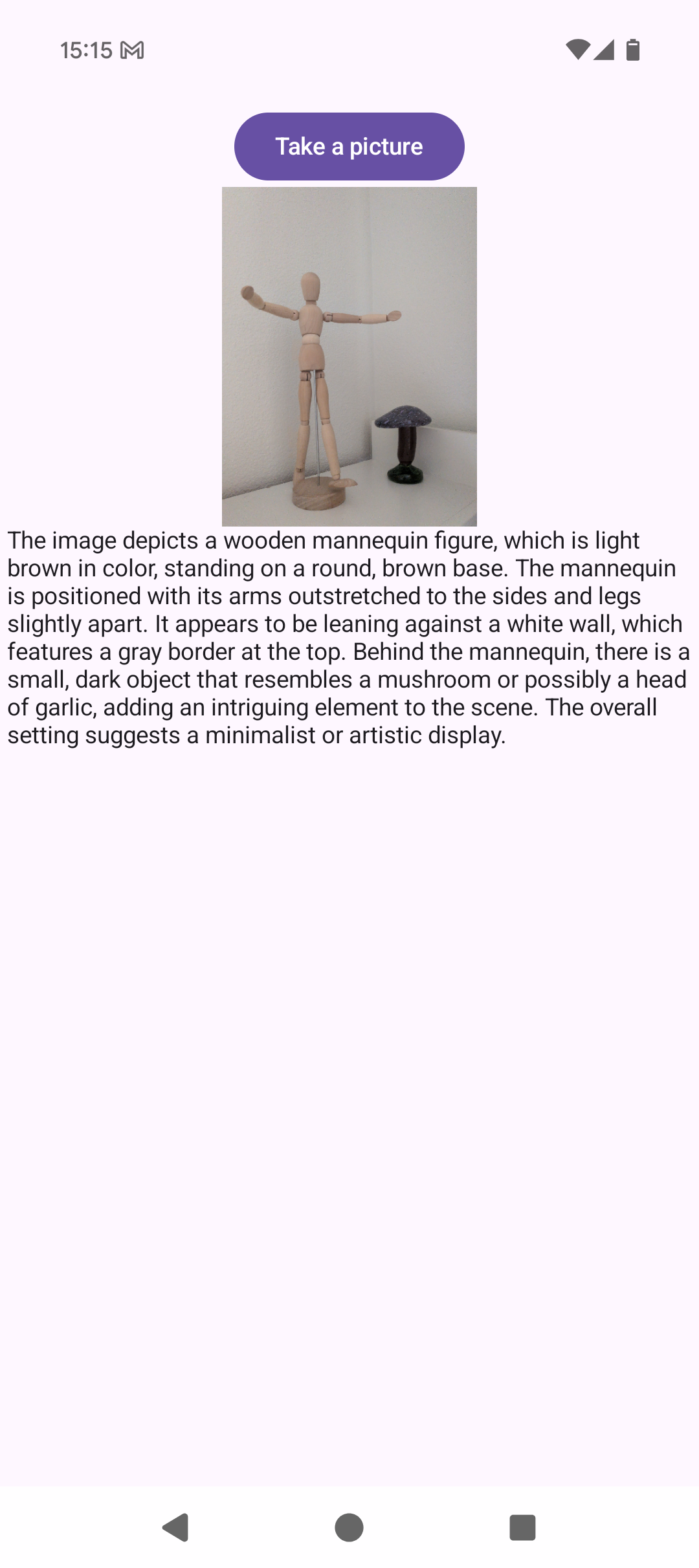
The interface shows:
* Selected image displayed clearly with Coil
* AI-generated analysis below the image
* Smooth, responsive UI even with large images
* Professional Material3 design
**Example analysis output:**
*Image: A sunset over a beach*
```
"The image shows a beautiful sunset scene at a beach. The sky displays
vibrant orange and pink hues as the sun sets on the horizon. The ocean
water reflects the warm colors of the sky. In the foreground, there are
silhouettes of people walking along the shoreline. The overall mood is
peaceful and serene."
```
All processing happens entirely on your Android device, ensuring complete privacy for your photos.
## Further improvements
Here are some ways to extend this example:
* **Camera integration** - Take photos directly in-app for immediate analysis
* **Multi-image support** - Compare and analyze multiple images simultaneously
* **Batch processing** - Process entire photo albums with progress tracking
* **Custom prompts** - Let users enter their own questions about images
* **Object detection** - Highlight detected objects with bounding boxes
* **Text extraction** - Pull out text from images (receipts, documents, signs)
* **Image editing suggestions** - Recommend crops, filters, or enhancements
* **Accessibility features** - Auto-generate alt text for images
* **Favorites and history** - Save analyzed images with their descriptions
* **Export functionality** - Share analysis results or create reports
* **Comparison mode** - Analyze differences between two images
* **Real-time video analysis** - Process camera frames in real-time
* **Multilingual descriptions** - Generate descriptions in different languages
* **Style transfer guidance** - Describe artistic styles and suggest transformations
## Need help?
Connect with the community and ask questions about this example.