> ## Documentation Index
> Fetch the complete documentation index at: https://docs.liquid.ai/llms.txt
> Use this file to discover all available pages before exploring further.
# Web Content Summarizer for Android
Browse the complete example on GitHub
This example demonstrates how to build a **web content summarizer** that leverages Android's sharing capabilities. ShareAI allows users to share web pages from their browser directly to the app, which then extracts and summarizes the content using on-device AI powered by LeapSDK.
The app combines **web scraping** with **local LLM processing** to provide quick, private summaries of articles, blog posts, and web pages without sending data to external servers.
## What's inside?
ShareAI demonstrates several key Android and AI integration patterns:
* **Android Share Intent Handling** - Receive shared URLs from browsers and other apps
* **Web Content Extraction** - Scrape and parse web page content
* **Local LLM Summarization** - Generate concise summaries on-device
* **Privacy-preserving Processing** - All content analysis happens locally
* **Intent Filter Configuration** - Proper manifest setup for share functionality
* **Asynchronous Processing** - Handle web fetching and AI generation without blocking UI
This example shows how to create utility apps that enhance the Android sharing ecosystem with AI capabilities.
## What it does
The ShareAI workflow is simple and intuitive:
1. **User finds interesting content** - Browse any website in Chrome, Firefox, or other browsers
2. **Share to ShareAI** - Tap the share button and select ShareAI from the share sheet
3. **Automatic extraction** - The app fetches and parses the web page content
4. **AI summarization** - LeapSDK processes the content and generates a concise summary
5. **Read or share summary** - View the summary in-app or share it to other apps
All processing happens on your device, ensuring complete privacy for the content you're reading.
## Environment setup
Before running this example, ensure you have the following:
Download and install [Android Studio](https://developer.android.com/studio) (latest stable version recommended).
Make sure you have:
* Android SDK installed
* An Android device or emulator configured
* USB debugging enabled (for physical devices)
This example requires:
* **Minimum SDK**: API 31 (Android 12)
* **Target SDK**: API 36
* **Kotlin**: 2.3.0 or higher
Add the required dependencies to your app-level `build.gradle.kts`:
```kotlin theme={"theme":{"light":"github-light","dark":"github-dark"}}
dependencies {
// LeapSDK for AI processing (0.10.0+)
implementation("ai.liquid.leap:leap-sdk:0.10.7")
implementation("ai.liquid.leap:leap-model-downloader:0.10.7")
// Networking for web scraping
implementation("com.squareup.okhttp3:okhttp:4.12.0")
implementation("org.jsoup:jsoup:1.17.2")
// Coroutines for async operations
implementation("org.jetbrains.kotlinx:kotlinx-coroutines-android:1.7.3")
// Android UI components
implementation("androidx.appcompat:appcompat:1.6.1")
implementation("com.google.android.material:material:1.11.0")
}
```
Configure your `AndroidManifest.xml` to receive shared URLs:
```xml theme={"theme":{"light":"github-light","dark":"github-dark"}}
```
This configuration makes ShareAI appear in the share sheet when users share web content.
## How to run it
Follow these steps to start summarizing web content:
1. **Clone the repository**
```bash theme={"theme":{"light":"github-light","dark":"github-dark"}}
git clone https://github.com/Liquid4All/LeapSDK-Examples.git
cd LeapSDK-Examples/Android/ShareAI
```
2. **Open in Android Studio**
* Launch Android Studio
* Select "Open an existing project"
* Navigate to the `ShareAI` folder and open it
3. **Gradle sync**
* Wait for Gradle to sync all dependencies
* Ensure all libraries download successfully
4. **Install on device**
* Connect your Android device or start an emulator
* Click "Run" or press `Shift + F10`
* The app will install on your device
5. **Share a webpage to ShareAI**
* Open any browser (Chrome, Firefox, Samsung Internet, etc.)
* Navigate to an article or blog post
* Tap the browser's share button
* Select "ShareAI" from the share sheet
* Wait for the app to fetch and summarize the content
6. **View the summary**
* The app will display a concise summary of the web page
* You can copy the summary or share it to other apps
* Return to the browser or share another page
**First Run**: The app will download the AI model on first use. This may take a few minutes depending on your connection speed. Subsequent summarizations will be much faster as the model is cached locally.
## Understanding the architecture
### Intent Handling Pattern
ShareAI demonstrates how to receive and process shared content from other apps:
```kotlin theme={"theme":{"light":"github-light","dark":"github-dark"}}
class MainActivity : AppCompatActivity() {
override fun onCreate(savedInstanceState: Bundle?) {
super.onCreate(savedInstanceState)
setContentView(R.layout.activity_main)
// Check if app was launched via share intent
when (intent?.action) {
Intent.ACTION_SEND -> {
if (intent.type == "text/plain") {
handleSharedUrl(intent)
}
}
}
}
private fun handleSharedUrl(intent: Intent) {
val sharedText = intent.getStringExtra(Intent.EXTRA_TEXT)
sharedText?.let { url ->
if (url.startsWith("http")) {
summarizeWebPage(url)
}
}
}
}
```
### Web Content Extraction
The app uses **Jsoup** to parse HTML and extract main content:
```kotlin theme={"theme":{"light":"github-light","dark":"github-dark"}}
suspend fun extractWebContent(url: String): String = withContext(Dispatchers.IO) {
val client = OkHttpClient()
val request = Request.Builder().url(url).build()
val response = client.newCall(request).execute()
val html = response.body?.string() ?: ""
// Parse HTML and extract main content
val document = Jsoup.parse(html)
// Remove scripts, styles, and navigation
document.select("script, style, nav, header, footer").remove()
// Extract article text
val content = document.select("article, main, .content").text()
if (content.isNotEmpty()) content else document.body().text()
}
```
### LeapSDK Integration for Summarization
Once content is extracted, LeapSDK generates a concise summary:
```kotlin theme={"theme":{"light":"github-light","dark":"github-dark"}}
import ai.liquid.leap.GenerationOptions
import ai.liquid.leap.ModelRunner
import ai.liquid.leap.message.ChatMessage
import ai.liquid.leap.message.MessageResponse
import ai.liquid.leap.downloader.LeapModelDownloader
import kotlinx.coroutines.flow.onEach
// Cache the runner on a ViewModel or singleton so the model loads once.
suspend fun summarizeContent(
runner: ModelRunner,
content: String,
): String {
val prompt = """
Summarize the following article in 3-5 concise sentences.
Focus on the main points and key takeaways.
Article:
$content
Summary:
""".trimIndent()
val conversation = runner.createConversation()
val options = GenerationOptions.build {
temperature = 0.3f
minP = 0.15f
repetitionPenalty = 1.05f
}
val out = StringBuilder()
conversation.generateResponse(ChatMessage(ChatMessage.Role.USER, prompt), options)
.onEach { resp ->
if (resp is MessageResponse.Chunk) out.append(resp.text)
}
.collect()
return out.toString().trim()
}
// One-time setup on app start or in your ViewModel's init {}:
// val downloader = LeapModelDownloader(applicationContext)
// val runner = downloader.loadModel(
// modelName = "LFM2-1.2B",
// quantizationType = "Q5_K_M",
// )
```
### Complete Flow
The full summarization pipeline:
1. **Receive Intent** → Extract URL from share intent
2. **Fetch Content** → Download HTML via OkHttp
3. **Parse HTML** → Extract main text content with Jsoup
4. **Generate Summary** → Process with LeapSDK on-device
5. **Display Result** → Show summary in UI with options to copy/share
All steps run asynchronously using Kotlin coroutines to keep the UI responsive.
## Demo
The ShareAI repository includes a screen recording demonstrating the full workflow:
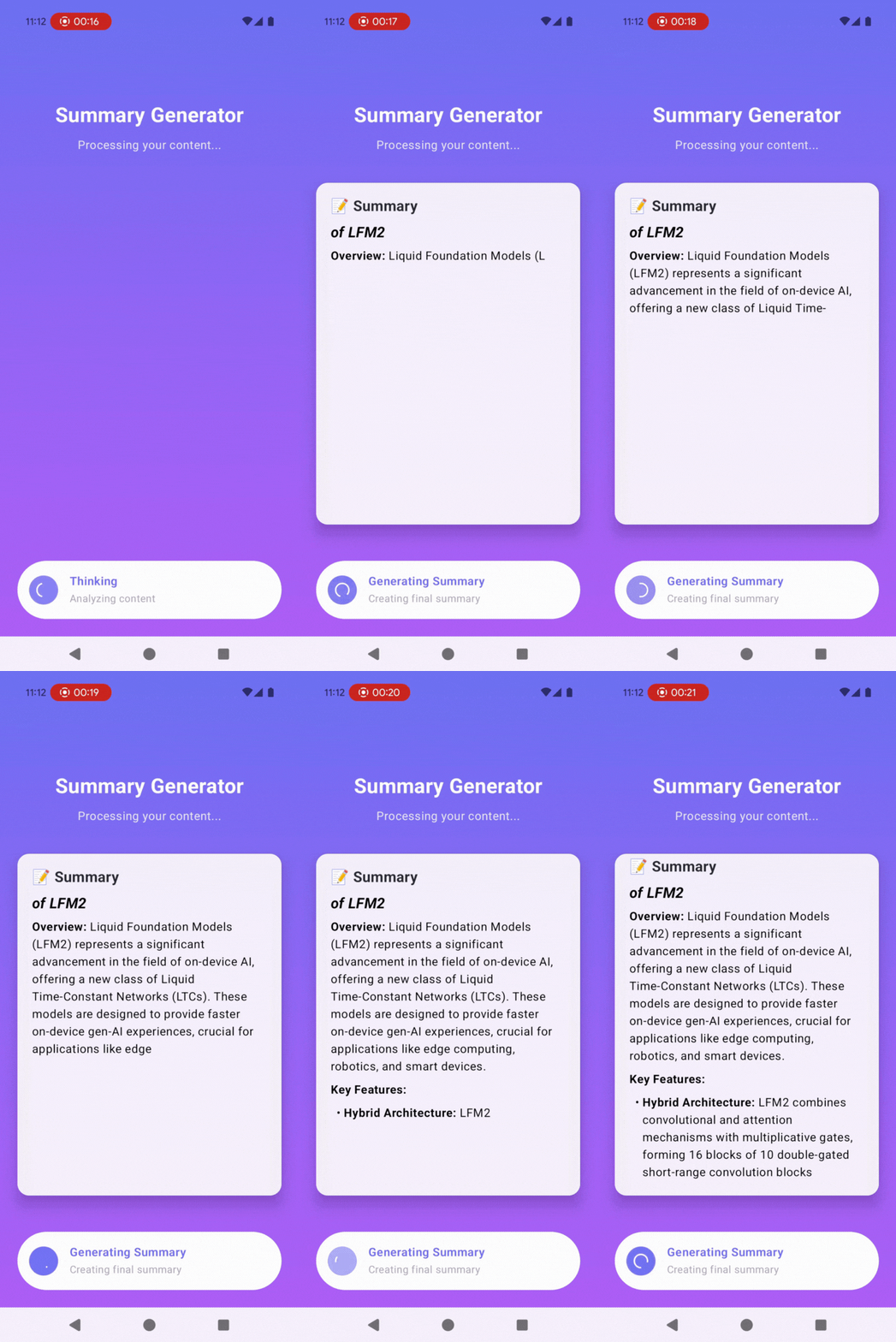
The demo shows:
* Opening a news article in Chrome
* Tapping the share button
* Selecting ShareAI from the share sheet
* The app extracting and summarizing the content
* Displaying the final summary in a clean interface
## Results and use cases
ShareAI is perfect for several scenarios:
**Research and Learning**
* Quickly summarize academic articles or technical documentation
* Extract key points from long blog posts
* Get the gist of news articles without reading the full text
**Content Curation**
* Save summaries of interesting articles to review later
* Share concise summaries with colleagues or friends
* Build a personal knowledge base of summarized content
**Privacy-conscious Reading**
* Summarize sensitive content without sending it to cloud services
* Process work-related articles without data leaving your device
* Read summaries of paywalled content (from accessible portions)
**Time Efficiency**
* Decide if an article is worth reading in full
* Scan multiple articles quickly by reviewing summaries
* Stay informed while reducing screen time
## Further improvements
Here are some ways to extend this example:
* **Batch processing** - Queue multiple URLs and summarize them in sequence
* **Summary length control** - Let users choose brief, medium, or detailed summaries
* **Language detection** - Automatically detect and handle non-English content
* **Offline queue** - Save shared URLs for summarization when model is available
* **Export options** - Save summaries as text files, PDFs, or to note-taking apps
* **Reading time estimate** - Show how long the original article would take to read
* **Key quotes extraction** - Highlight important quotes in addition to summary
* **Topic tagging** - Automatically categorize summaries by topic
* **Summary history** - Keep a searchable archive of all summarized content
* **Custom prompts** - Let users define their own summarization style
* **Image extraction** - Include relevant images from the article
* **Multi-language summarization** - Summarize in a different language than the source
## Need help?
Connect with the community and ask questions about this example.