> ## Documentation Index
> Fetch the complete documentation index at: https://docs.liquid.ai/llms.txt
> Use this file to discover all available pages before exploring further.
# Fine-Tune a Vision-Language Model on Satellite Imagery
Browse the complete example on GitHub
Fine-tune [LiquidAI/LFM2.5-VL-450M](https://huggingface.co/LiquidAI/LFM2.5-VL-450M) on satellite imagery tasks using
* [leap-finetune](https://github.com/Liquid4All/leap-finetune/): Liquid AI's fine-tuning framework for LFM models.
* [Modal](https://modal.com): serverless GPU cloud for running data prep and training without managing infrastructure.
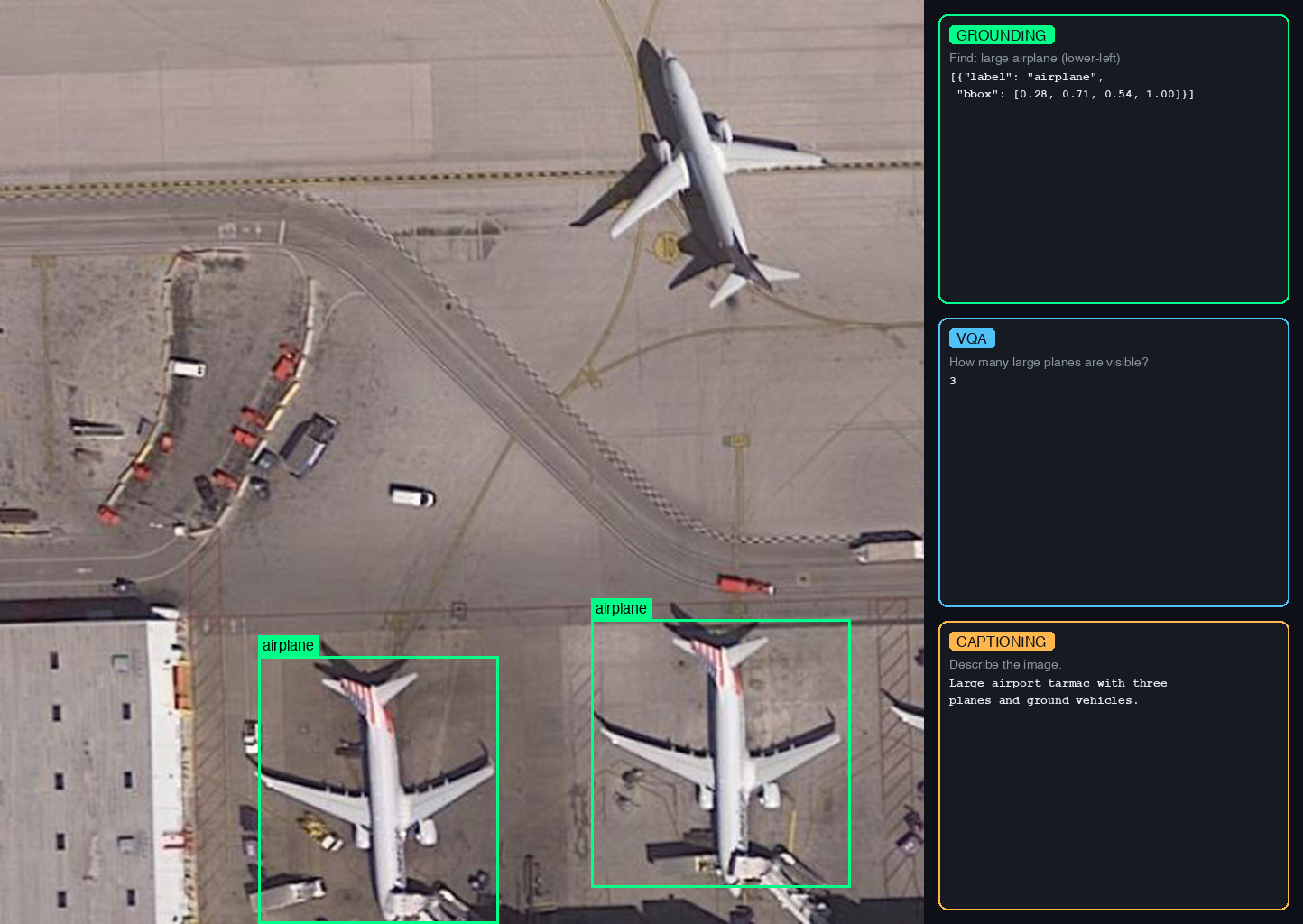
* [VRSBench](https://huggingface.co/datasets/xiang709/VRSBench) dataset (NeurIPS 2024) which supports three tasks:
* **VQA**: answer questions about satellite images (123K QA pairs)
* **Visual Grounding**: detect and localize objects with bounding boxes (52K references)
* **Captioning**: generate detailed descriptions of satellite scenes (29K captions)
 ## Quickstart
1. **Install and authenticate** (run from `cookbook/examples/satellite-vlm/`):
Modal provides serverless GPUs you pay for per second. New accounts include \$30 of free credit, enough to run this example end to end. No local GPU required.
```bash theme={"theme":{"light":"github-light","dark":"github-dark"}}
uv sync
uv run python -m modal setup
uv run huggingface-cli login
```
2. **Prepare data** (\~12 GB): the download and conversion run inside a Modal container, and the resulting data is pushed to a Modal volume where the fine-tuning job will pick it up.
```bash theme={"theme":{"light":"github-light","dark":"github-dark"}}
uv run python prepare_vrsbench.py --task all --modal
```
3. **Clone leap-finetune and kick off fine-tuning** on an H100, checkpoints saved to the `satellite-vlm` Modal volume:
```bash theme={"theme":{"light":"github-light","dark":"github-dark"}}
git clone https://github.com/Liquid4All/leap-finetune/
cd leap-finetune
uv sync
uv run leap-finetune ../configs/vrsbench_multitask_modal.yaml
```
## How It Works
All heavy computation runs in the cloud. The only things that run locally are the `prepare_vrsbench.py` launcher and the `leap-finetune` CLI, both of which just submit jobs and stream logs.
1. **Data prep (Modal CPU container):** `prepare_vrsbench.py --modal` spins up a Modal container, downloads VRSBench (\~12 GB) from HuggingFace, converts it to JSONL, and writes everything to a Modal volume named `satellite-vlm`.
2. **Training (Modal H100):** `leap-finetune` submits a training job that reads data from the same volume, fine-tunes the model, and saves checkpoints back to the volume.
3. **Retrieval (local):** you pull the checkpoints from the volume to your local machine with `modal volume get`.
## Data Preparation
`prepare_vrsbench.py` downloads VRSBench from HuggingFace and converts it to the JSONL format required by leap-finetune.
**Modal (recommended):** runs entirely in the cloud, writes directly to the `satellite-vlm` Modal volume:
```bash theme={"theme":{"light":"github-light","dark":"github-dark"}}
uv run python prepare_vrsbench.py --task all --modal
```
**Local (for development):** single task or limited sample count for quick iteration:
```bash theme={"theme":{"light":"github-light","dark":"github-dark"}}
uv run python prepare_vrsbench.py --task vqa --limit 500
```
Output files (written to `./data/` locally, or to the Modal volume with `--modal`):
* `vrsbench_{task}_train.jsonl`: training data
* `vrsbench_{task}_eval.jsonl`: evaluation data
## Training
Run from the `leap-finetune` root (cloned in the Quickstart):
```bash theme={"theme":{"light":"github-light","dark":"github-dark"}}
uv run leap-finetune ../configs/vrsbench_multitask_modal.yaml
```
The job runs on an H100, streams logs to your terminal, and saves checkpoints to the `satellite-vlm` Modal volume under `/satellite-vlm/outputs/`.
To enable experiment tracking, uncomment `tracker: "wandb"` in the config.
## Retrieving Checkpoints
List and download checkpoints from the Modal volume:
```bash theme={"theme":{"light":"github-light","dark":"github-dark"}}
modal volume ls satellite-vlm outputs/
modal volume get satellite-vlm /satellite-vlm/outputs/ ./outputs
```
## Data Format
The grounding task uses JSON bounding box format with 0-1 normalized coordinates, matching the LFM VLM's pretraining format:
```
User: Inspect the image and detect the large white ship.
Provide result as a valid JSON:
[{"label": str, "bbox": [x1,y1,x2,y2]}, ...].
Coordinates must be normalized to 0-1.
Assistant: [{"label": "ship", "bbox": [0.37, 0.00, 0.80, 0.99]}]
```
VQA and captioning use standard question-answer format with no special structure.
## Evaluation
Benchmarks run automatically during training at every `eval_steps`:
* **VQA**: `short_answer` metric (case-insensitive substring match)
* **Grounding**: `grounding_iou` metric (IoU\@0.5 threshold)
* **Captioning**: `CIDEr` or `BLEU` metrics
Each eval dataset can be limited (e.g., 500 samples) via the `limit` field in the YAML config for faster iteration.
**Running a full standalone evaluation:** to evaluate on the complete dataset without retraining, use `configs/vrsbench_full_eval.yaml`. Set `eval_on_start: true`, remove the `limit` fields, and point the config at your checkpoint path. The model runs the full evaluation at step 0, logs results to WandB, and terminates.
## AI in Space Hackathon
This example is the official starting point for the [**AI in Space Hackathon**](https://luma.com/n9cw58h0), a fully online event organised in partnership between [DPhi Space](https://github.com/DPhi-Space/SimSat) and Liquid AI, open to builders from all around the globe.
Use this fine-tuning pipeline as your baseline and push it further with real satellite data.
[
## Quickstart
1. **Install and authenticate** (run from `cookbook/examples/satellite-vlm/`):
Modal provides serverless GPUs you pay for per second. New accounts include \$30 of free credit, enough to run this example end to end. No local GPU required.
```bash theme={"theme":{"light":"github-light","dark":"github-dark"}}
uv sync
uv run python -m modal setup
uv run huggingface-cli login
```
2. **Prepare data** (\~12 GB): the download and conversion run inside a Modal container, and the resulting data is pushed to a Modal volume where the fine-tuning job will pick it up.
```bash theme={"theme":{"light":"github-light","dark":"github-dark"}}
uv run python prepare_vrsbench.py --task all --modal
```
3. **Clone leap-finetune and kick off fine-tuning** on an H100, checkpoints saved to the `satellite-vlm` Modal volume:
```bash theme={"theme":{"light":"github-light","dark":"github-dark"}}
git clone https://github.com/Liquid4All/leap-finetune/
cd leap-finetune
uv sync
uv run leap-finetune ../configs/vrsbench_multitask_modal.yaml
```
## How It Works
All heavy computation runs in the cloud. The only things that run locally are the `prepare_vrsbench.py` launcher and the `leap-finetune` CLI, both of which just submit jobs and stream logs.
1. **Data prep (Modal CPU container):** `prepare_vrsbench.py --modal` spins up a Modal container, downloads VRSBench (\~12 GB) from HuggingFace, converts it to JSONL, and writes everything to a Modal volume named `satellite-vlm`.
2. **Training (Modal H100):** `leap-finetune` submits a training job that reads data from the same volume, fine-tunes the model, and saves checkpoints back to the volume.
3. **Retrieval (local):** you pull the checkpoints from the volume to your local machine with `modal volume get`.
## Data Preparation
`prepare_vrsbench.py` downloads VRSBench from HuggingFace and converts it to the JSONL format required by leap-finetune.
**Modal (recommended):** runs entirely in the cloud, writes directly to the `satellite-vlm` Modal volume:
```bash theme={"theme":{"light":"github-light","dark":"github-dark"}}
uv run python prepare_vrsbench.py --task all --modal
```
**Local (for development):** single task or limited sample count for quick iteration:
```bash theme={"theme":{"light":"github-light","dark":"github-dark"}}
uv run python prepare_vrsbench.py --task vqa --limit 500
```
Output files (written to `./data/` locally, or to the Modal volume with `--modal`):
* `vrsbench_{task}_train.jsonl`: training data
* `vrsbench_{task}_eval.jsonl`: evaluation data
## Training
Run from the `leap-finetune` root (cloned in the Quickstart):
```bash theme={"theme":{"light":"github-light","dark":"github-dark"}}
uv run leap-finetune ../configs/vrsbench_multitask_modal.yaml
```
The job runs on an H100, streams logs to your terminal, and saves checkpoints to the `satellite-vlm` Modal volume under `/satellite-vlm/outputs/`.
To enable experiment tracking, uncomment `tracker: "wandb"` in the config.
## Retrieving Checkpoints
List and download checkpoints from the Modal volume:
```bash theme={"theme":{"light":"github-light","dark":"github-dark"}}
modal volume ls satellite-vlm outputs/
modal volume get satellite-vlm /satellite-vlm/outputs/ ./outputs
```
## Data Format
The grounding task uses JSON bounding box format with 0-1 normalized coordinates, matching the LFM VLM's pretraining format:
```
User: Inspect the image and detect the large white ship.
Provide result as a valid JSON:
[{"label": str, "bbox": [x1,y1,x2,y2]}, ...].
Coordinates must be normalized to 0-1.
Assistant: [{"label": "ship", "bbox": [0.37, 0.00, 0.80, 0.99]}]
```
VQA and captioning use standard question-answer format with no special structure.
## Evaluation
Benchmarks run automatically during training at every `eval_steps`:
* **VQA**: `short_answer` metric (case-insensitive substring match)
* **Grounding**: `grounding_iou` metric (IoU\@0.5 threshold)
* **Captioning**: `CIDEr` or `BLEU` metrics
Each eval dataset can be limited (e.g., 500 samples) via the `limit` field in the YAML config for faster iteration.
**Running a full standalone evaluation:** to evaluate on the complete dataset without retraining, use `configs/vrsbench_full_eval.yaml`. Set `eval_on_start: true`, remove the `limit` fields, and point the config at your checkpoint path. The model runs the full evaluation at step 0, logs results to WandB, and terminates.
## AI in Space Hackathon
This example is the official starting point for the [**AI in Space Hackathon**](https://luma.com/n9cw58h0), a fully online event organised in partnership between [DPhi Space](https://github.com/DPhi-Space/SimSat) and Liquid AI, open to builders from all around the globe.
Use this fine-tuning pipeline as your baseline and push it further with real satellite data.
[ ](https://luma.com/n9cw58h0)
Connect with the community and ask questions about this example.
](https://luma.com/n9cw58h0)
Connect with the community and ask questions about this example.