> ## Documentation Index
> Fetch the complete documentation index at: https://docs.liquid.ai/llms.txt
> Use this file to discover all available pages before exploring further.
# Audio transcription in real-time
Browse the complete example on GitHub
This example demonstrates how to use the [LFM2-Audio-1.5B](https://docs.liquid.ai/lfm/models/lfm2-audio-1.5b) model with llama.cpp to transcribe audio files locally in real-time.
Intelligent audio assistants on the edge are possible, and this repository is just one step towards that.
## Quick start
1. Clone the repository
```sh theme={"theme":{"light":"github-light","dark":"github-dark"}}
git clone https://github.com/Liquid4All/cookbook.git
cd cookbook/examples/audio-transcription-cli
```
2. Install uv on your system, if you don't have it already.
**macOS/Linux:**
```bash theme={"theme":{"light":"github-light","dark":"github-dark"}}
curl -LsSf https://astral.sh/uv/install.sh | sh
```
**Windows:**
```powershell theme={"theme":{"light":"github-light","dark":"github-dark"}}
powershell -ExecutionPolicy ByPass -c "irm https://astral.sh/uv/install.ps1 | iex"
```
3. Download a few audio samples
```sh theme={"theme":{"light":"github-light","dark":"github-dark"}}
uv run download_audio_samples.py
```
4. Run the transcription CLI, and see the transcription of the audio sample in the console.
```sh theme={"theme":{"light":"github-light","dark":"github-dark"}}
uv run transcribe --audio './audio-samples/barackobamafederalplaza.mp3' --play-audio
```
By passing the `--play-audio` flag, you will hear the audio in the background during transcription.
## Understanding the architecture
This example is a 100% local audio-to-text transcription CLI, that runs on your machine thanks to llama.cpp. Neither inputs audios nor outputs text are sent to any server. Everything runs on your machine.
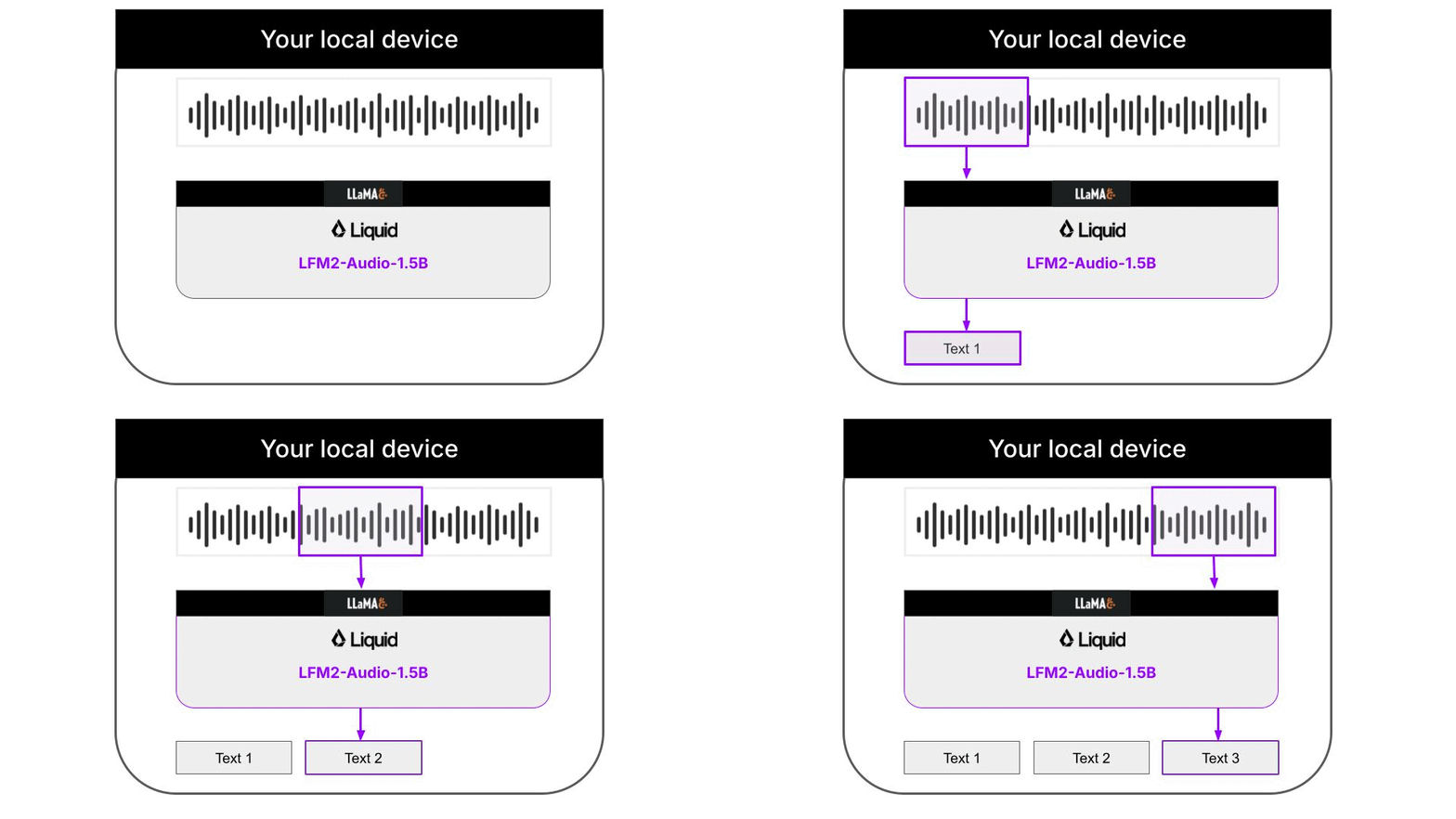
The Python code downloads the necessary llama.cpp builds for your platform automatically, so you don't need to worry about it. Audio support in llama.cpp is still quite experimental, and not fully integrated on the main branch of the llama.cpp project. Because of this, the Liquid AI team has released specialized llama.cpp builds that support the LFM2-Audio-1.5B model, that you will need to run this CLI.
**Supported Platforms**
The following platforms are currently supported:
* android-arm64
* macos-arm64
* ubuntu-arm64
* ubuntu-x64
If your platform is not supported, you will need to wait for the builds to be released.
## llama.cpp support for audio models
[llama.cpp](https://github.com/ggerganov/llama.cpp) is a super fast and lightweight open-source inference engine for Language Models. It is written in C++ and can be used to run LLMs on your local machine. For example, our Python CLI used llama.cpp under the hood to deliver fast transcriptions, instead of using either `PyTorch` or the higher-level `transformers` library.
In the [examples.sh](https://github.com/Liquid4All/cookbook/blob/main/examples/audio-transcription-cli/examples.sh) script you will find 3 examples on how to run inference with LFM2-Audio-1.5 for 3 common use cases:
* Audio to text transcription. This is essentially what our Python CLI does under the hood:
```sh theme={"theme":{"light":"github-light","dark":"github-dark"}}
# Audio to Speech Recognition (ASR)
./llama-lfm2-audio \
-m $CKPT/LFM2-Audio-1.5B-Q8_0.gguf \
--mmproj $CKPT/mmproj-audioencoder-LFM2-Audio-1.5B-Q8_0.gguf \
-mv $CKPT/audiodecoder-LFM2-Audio-1.5B-Q8_0.gguf \
-sys "Perform ASR." \
--audio $INPUT_WAV
```
* Text to speech.
```sh theme={"theme":{"light":"github-light","dark":"github-dark"}}
# Text To Speech (TTS)
./llama-lfm2-audio \
-m $CKPT/LFM2-Audio-1.5B-Q8_0.gguf \
--mmproj $CKPT/mmproj-audioencoder-LFM2-Audio-1.5B-Q8_0.gguf \
-mv $CKPT/audiodecoder-LFM2-Audio-1.5B-Q8_0.gguf \
-sys "Perform TTS." \
-p "My name is Pau Labarta Bajo and I love AI" \
--output $OUTPUT_WAV
```
* Text to speech with voice instructions
```sh theme={"theme":{"light":"github-light","dark":"github-dark"}}
./llama-lfm2-audio \
-m $CKPT/LFM2-Audio-1.5B-Q8_0.gguf \
--mmproj $CKPT/mmproj-audioencoder-LFM2-Audio-1.5B-Q8_0.gguf \
-mv $CKPT/audiodecoder-LFM2-Audio-1.5B-Q8_0.gguf \
-sys "Perform TTS.
Use the following voice: A male speaker delivers a very expressive and animated speech, with a low-pitch voice and a slightly close-sounding tone. The recording carries a slight background noise." \
-p "What is your name man?" \
--output $OUTPUT_WAV
```
## Further improvements
The decoded text is not perfect, due to overlapping chunk and partial sentences that are grammatically incorrect.
To improve the transcription, we can use a text cleaning model to clean the text, in a local 2-step workflow for real-time Audio to Speech recognition.
For example, we can use
* LFM2-Audio-1.5B for audio to text extraction
* LFM2-350M for text cleaning
### What is LFM2-350M?
[LFM2-350M](https://docs.liquid.ai/lfm/models/lfm2-350m) is a small text-to-text model that can be used for tasks like text cleaning. To achieve optimal performance for your particular use case, you need to optimize your system and user prompts.
## Need help?
Connect with the community and ask questions about this example.