> ## Documentation Index
> Fetch the complete documentation index at: https://docs.liquid.ai/llms.txt
> Use this file to discover all available pages before exploring further.
# Build a game with decision models
Browse the complete example on GitHub
This example shows how to use Liquid's [decision model](/lfm/models/decision-models) to make structured choices in real time. You will build a pixel-art survival racer where an AI chooses which lane to drive in, hundreds of times per race.
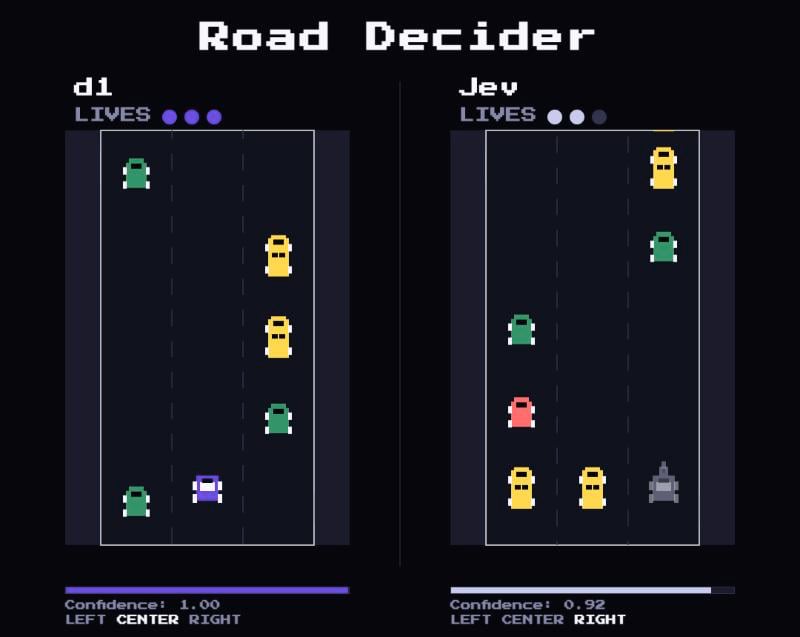 Two cars race side by side on identical roads that get faster over time. Each car has three lives, and hitting traffic costs one. Play **You vs d1** with the arrow keys, or watch **Jev vs d1** to compare two decision models head-to-head.
Decision models are purpose-built for classification, routing, and scoring. Instead of generating text token by token, they return a structured answer in a single call. That makes them fast enough to use inside a game loop, and cheap enough to call on every tick.
## Quickstart
### 1. Clone the repository
```sh theme={"theme":{"light":"github-light","dark":"github-dark"}}
git clone https://github.com/Liquid4All/cookbook.git
cd cookbook/examples/road-decider
```
### 2. Add your API keys
Create a `.env` file from the template:
```sh theme={"theme":{"light":"github-light","dark":"github-dark"}}
cp .env.example .env
```
Obtain a LIQUID\_API\_KEY:
1. Go to [console.liquid.ai](https://console.liquid.ai). If you don't have an account yet, register and join an organization.
2. Navigate to **Dashboard > API Keys**.
3. Create a new key and copy it. Keys are prefixed with `liquid_`.
Add your Liquid API key:
```sh theme={"theme":{"light":"github-light","dark":"github-dark"}}
LIQUID_API_KEY=your-liquid-api-key
```
Jev vs d1 mode is optional. To enable it, add an OpenRouter key as `OPENROUTER_API_KEY`.
### 3. Install dependencies and start the demo
```sh theme={"theme":{"light":"github-light","dark":"github-dark"}}
npm install
npm run dev
```
Open `localhost` and start a race. If a key is missing, the start screen tells you which one and disables the modes that need it.
## What's inside?
The project is a vanilla JavaScript browser game with a Vite dev-server proxy:
* `ai/ai.js` defines the decision question, builds the game state, calls the proxy route, and normalizes the answer.
* `game/game.js` owns the game loop, AI tick scheduling, collisions, and race results.
* `game/road.js` and `game/items.js` generate identical traffic patterns for both roads.
* `ui/` renders the canvas sprites, confidence bars, HUD, and keyboard input.
* `vite.config.js` keeps API keys server-side and forwards decision requests to Liquid or OpenRouter.
## How it works
Every decision tick, the AI car does four things:
1. Defines a structured **choice** question.
2. Summarizes the road ahead as a compact text state.
3. Sends the state and question to the decision API.
4. Applies the returned lane choice to the car.
### Define the question
The game asks the model to pick one of three named lanes:
```js theme={"theme":{"light":"github-light","dark":"github-dark"}}
const QUESTION = {
lane: {
type: "choice",
instructions:
"Pick the safest lane. Row 1 is most urgent. Prefer the current lane when options are equally safe.",
criteria: {
left: "Left lane",
center: "Center lane",
right: "Right lane",
},
},
};
```
The `type` tells the model what kind of answer to return. The `criteria` object lists the available options.
### Build the state
The AI does not receive the entire game screen. Instead, the game summarizes the nearest obstacle in each lane:
```js theme={"theme":{"light":"github-light","dark":"github-dark"}}
export function buildState(car, road) {
const currentLane = LANES[Math.round(car.laneIndex)];
const lookAhead = road.getLookAhead(car.y, CONFIG.LOOK_AHEAD_ROWS);
const laneSummaries = LANES.map((lane) => {
const firstObstacle = lookAhead[lane].findIndex((item) => item !== null);
if (firstObstacle === -1) return `${lane}: clear`;
return `${lane}: obstacle at row ${firstObstacle + 1}`;
});
return [
`Current lane: ${currentLane}. Pick the lane with the most room ahead.`,
"",
...laneSummaries,
].join("\n");
}
```
That produces a state like:
```txt theme={"theme":{"light":"github-light","dark":"github-dark"}}
Current lane: center. Pick the lane with the most room ahead.
left: obstacle at row 2
center: clear
right: obstacle at row 4
```
This compact format gives the model the safety-relevant information without asking it to reason over raw pixels or a full grid.
### Call the decision API
The browser calls a local proxy route for each racer:
```js theme={"theme":{"light":"github-light","dark":"github-dark"}}
fetch(`/api/decision/${racer}`, {
method: "POST",
headers: { "Content-Type": "application/json" },
body: JSON.stringify({
state,
questions: QUESTION,
}),
});
```
The Vite proxy adds the API key and model server-side:
```js theme={"theme":{"light":"github-light","dark":"github-dark"}}
const upstream = await fetch(racer.url, {
method: "POST",
headers: {
Authorization: `Bearer ${racer.apiKey}`,
"Content-Type": "application/json",
},
body: JSON.stringify({ ...body, model: racer.model }),
});
```
This keeps keys out of the browser while letting the frontend use a simple local API.
### Interpret the response
The API returns the selected choice, per-lane probabilities, and confidence:
```json theme={"theme":{"light":"github-light","dark":"github-dark"}}
{
"answers": {
"lane": {
"type": "choice",
"choice": "center",
"probabilities": { "left": 0.03, "center": 0.93, "right": 0.04 },
"confidence": 0.93
}
}
}
```
The game validates that the choice is one of the known lanes, moves the car, and updates the live confidence display below the road.
## Configuration
By default, d1 runs through Liquid's API and Jev runs through OpenRouter:
| Variable | Default | Description |
| - | - | - |
| `LIQUID_API_KEY` | | API key for d1. Required. |
| `LIQUID_MODEL_NAME` | `d1:free` | d1 model name. |
| `LIQUID_BASE_URL` | `https://api.liquid.ai` | API host for d1. |
| `OPENROUTER_API_KEY` | | OpenRouter API key. Required for Jev vs d1 mode. |
| `OPENROUTER_MODEL_NAME` | `typesafe/jev-1.13` | Jev model name. |
| `OPENROUTER_BASE_URL` | `https://openrouter.ai` | API host for Jev. |
To run d1 through OpenRouter instead of Liquid's API:
```sh theme={"theme":{"light":"github-light","dark":"github-dark"}}
LIQUID_API_KEY=your-openrouter-api-key
LIQUID_MODEL_NAME=your-openrouter-d1-model
LIQUID_BASE_URL=https://openrouter.ai
```
## Need help?
Connect with the community and ask questions about this example.
Two cars race side by side on identical roads that get faster over time. Each car has three lives, and hitting traffic costs one. Play **You vs d1** with the arrow keys, or watch **Jev vs d1** to compare two decision models head-to-head.
Decision models are purpose-built for classification, routing, and scoring. Instead of generating text token by token, they return a structured answer in a single call. That makes them fast enough to use inside a game loop, and cheap enough to call on every tick.
## Quickstart
### 1. Clone the repository
```sh theme={"theme":{"light":"github-light","dark":"github-dark"}}
git clone https://github.com/Liquid4All/cookbook.git
cd cookbook/examples/road-decider
```
### 2. Add your API keys
Create a `.env` file from the template:
```sh theme={"theme":{"light":"github-light","dark":"github-dark"}}
cp .env.example .env
```
Obtain a LIQUID\_API\_KEY:
1. Go to [console.liquid.ai](https://console.liquid.ai). If you don't have an account yet, register and join an organization.
2. Navigate to **Dashboard > API Keys**.
3. Create a new key and copy it. Keys are prefixed with `liquid_`.
Add your Liquid API key:
```sh theme={"theme":{"light":"github-light","dark":"github-dark"}}
LIQUID_API_KEY=your-liquid-api-key
```
Jev vs d1 mode is optional. To enable it, add an OpenRouter key as `OPENROUTER_API_KEY`.
### 3. Install dependencies and start the demo
```sh theme={"theme":{"light":"github-light","dark":"github-dark"}}
npm install
npm run dev
```
Open `localhost` and start a race. If a key is missing, the start screen tells you which one and disables the modes that need it.
## What's inside?
The project is a vanilla JavaScript browser game with a Vite dev-server proxy:
* `ai/ai.js` defines the decision question, builds the game state, calls the proxy route, and normalizes the answer.
* `game/game.js` owns the game loop, AI tick scheduling, collisions, and race results.
* `game/road.js` and `game/items.js` generate identical traffic patterns for both roads.
* `ui/` renders the canvas sprites, confidence bars, HUD, and keyboard input.
* `vite.config.js` keeps API keys server-side and forwards decision requests to Liquid or OpenRouter.
## How it works
Every decision tick, the AI car does four things:
1. Defines a structured **choice** question.
2. Summarizes the road ahead as a compact text state.
3. Sends the state and question to the decision API.
4. Applies the returned lane choice to the car.
### Define the question
The game asks the model to pick one of three named lanes:
```js theme={"theme":{"light":"github-light","dark":"github-dark"}}
const QUESTION = {
lane: {
type: "choice",
instructions:
"Pick the safest lane. Row 1 is most urgent. Prefer the current lane when options are equally safe.",
criteria: {
left: "Left lane",
center: "Center lane",
right: "Right lane",
},
},
};
```
The `type` tells the model what kind of answer to return. The `criteria` object lists the available options.
### Build the state
The AI does not receive the entire game screen. Instead, the game summarizes the nearest obstacle in each lane:
```js theme={"theme":{"light":"github-light","dark":"github-dark"}}
export function buildState(car, road) {
const currentLane = LANES[Math.round(car.laneIndex)];
const lookAhead = road.getLookAhead(car.y, CONFIG.LOOK_AHEAD_ROWS);
const laneSummaries = LANES.map((lane) => {
const firstObstacle = lookAhead[lane].findIndex((item) => item !== null);
if (firstObstacle === -1) return `${lane}: clear`;
return `${lane}: obstacle at row ${firstObstacle + 1}`;
});
return [
`Current lane: ${currentLane}. Pick the lane with the most room ahead.`,
"",
...laneSummaries,
].join("\n");
}
```
That produces a state like:
```txt theme={"theme":{"light":"github-light","dark":"github-dark"}}
Current lane: center. Pick the lane with the most room ahead.
left: obstacle at row 2
center: clear
right: obstacle at row 4
```
This compact format gives the model the safety-relevant information without asking it to reason over raw pixels or a full grid.
### Call the decision API
The browser calls a local proxy route for each racer:
```js theme={"theme":{"light":"github-light","dark":"github-dark"}}
fetch(`/api/decision/${racer}`, {
method: "POST",
headers: { "Content-Type": "application/json" },
body: JSON.stringify({
state,
questions: QUESTION,
}),
});
```
The Vite proxy adds the API key and model server-side:
```js theme={"theme":{"light":"github-light","dark":"github-dark"}}
const upstream = await fetch(racer.url, {
method: "POST",
headers: {
Authorization: `Bearer ${racer.apiKey}`,
"Content-Type": "application/json",
},
body: JSON.stringify({ ...body, model: racer.model }),
});
```
This keeps keys out of the browser while letting the frontend use a simple local API.
### Interpret the response
The API returns the selected choice, per-lane probabilities, and confidence:
```json theme={"theme":{"light":"github-light","dark":"github-dark"}}
{
"answers": {
"lane": {
"type": "choice",
"choice": "center",
"probabilities": { "left": 0.03, "center": 0.93, "right": 0.04 },
"confidence": 0.93
}
}
}
```
The game validates that the choice is one of the known lanes, moves the car, and updates the live confidence display below the road.
## Configuration
By default, d1 runs through Liquid's API and Jev runs through OpenRouter:
| Variable | Default | Description |
| - | - | - |
| `LIQUID_API_KEY` | | API key for d1. Required. |
| `LIQUID_MODEL_NAME` | `d1:free` | d1 model name. |
| `LIQUID_BASE_URL` | `https://api.liquid.ai` | API host for d1. |
| `OPENROUTER_API_KEY` | | OpenRouter API key. Required for Jev vs d1 mode. |
| `OPENROUTER_MODEL_NAME` | `typesafe/jev-1.13` | Jev model name. |
| `OPENROUTER_BASE_URL` | `https://openrouter.ai` | API host for Jev. |
To run d1 through OpenRouter instead of Liquid's API:
```sh theme={"theme":{"light":"github-light","dark":"github-dark"}}
LIQUID_API_KEY=your-openrouter-api-key
LIQUID_MODEL_NAME=your-openrouter-d1-model
LIQUID_BASE_URL=https://openrouter.ai
```
## Need help?
Connect with the community and ask questions about this example.