> ## Documentation Index
> Fetch the complete documentation index at: https://docs.liquid.ai/llms.txt
> Use this file to discover all available pages before exploring further.
# Real-time video captioning with LFM2.5-VL-1.6B and WebGPU
Browse the complete example on GitHub
This example demonstrates how to run a vision-language model directly in your web browser using WebGPU acceleration. The demo showcases real-time video captioning with the [LFM2.5-VL-1.6B](/lfm/models/lfm25-vl-1.6b) model, eliminating the need for cloud-based inference services.
## Key Features
* **Complete privacy**: All data stays on your device - no information is sent to external servers
* **Low latency**: No network overhead, ideal for real-time video processing
* **Zero inference cost**: No API charges after the initial model download
* **Offline capability**: Works without an internet connection once the model is cached
* **No rate limits**: Process as many frames as your hardware can handle
## Quick Start
1. Clone the repository
```bash theme={"theme":{"light":"github-light","dark":"github-dark"}}
git clone https://github.com/Liquid4All/cookbook.git
cd cookbook/examples/vl-webgpu-demo
```
2. Verify you have npm installed on your system
```bash theme={"theme":{"light":"github-light","dark":"github-dark"}}
npm --version
```
3. Install dependencies
```bash theme={"theme":{"light":"github-light","dark":"github-dark"}}
npm install
```
4. Start the development server
```bash theme={"theme":{"light":"github-light","dark":"github-dark"}}
npm run dev
```
5. Access the application at `http://localhost:5173` in your browser
## Understanding the Architecture
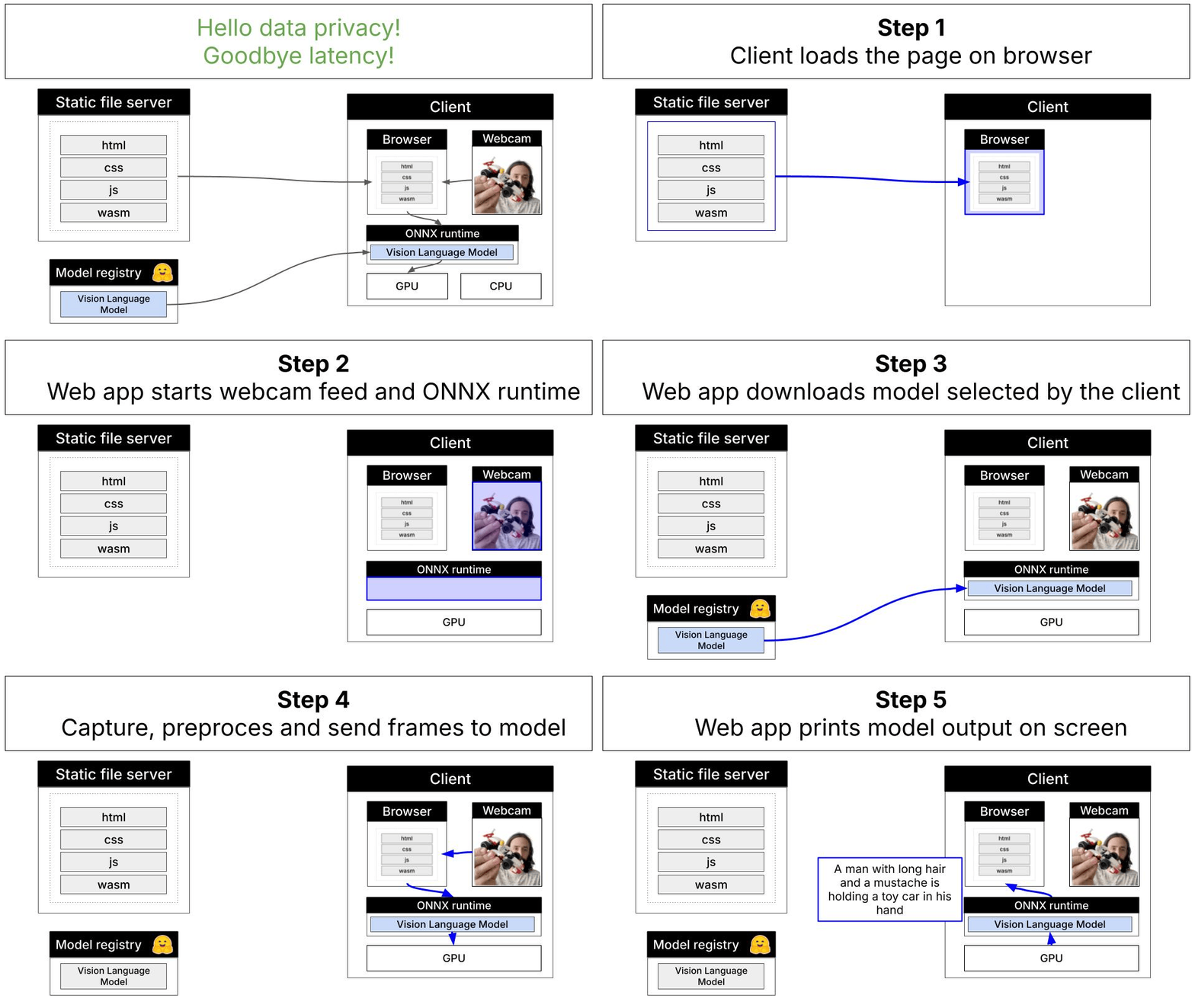
This demo uses the **[LFM2.5-VL-1.6B](/lfm/models/lfm25-vl-1.6b)** model, a 1.6 billion parameter vision-language model that has been quantized for efficient browser-based inference. The model runs entirely client-side using ONNX Runtime Web with WebGPU acceleration.
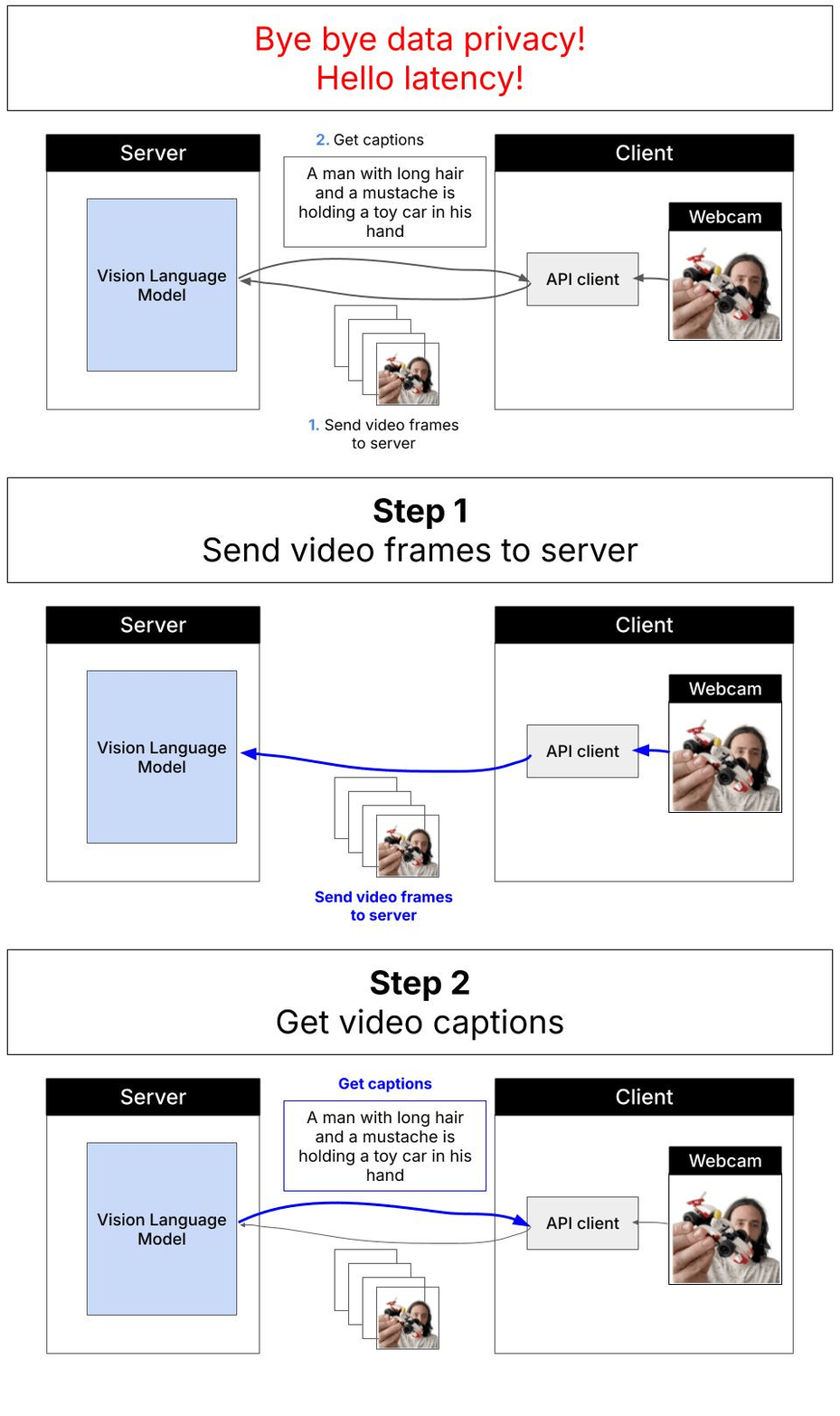
### Remote vs. Local Inference
Traditional cloud-based approaches require sending video frames to remote servers for processing:
With WebGPU and local inference, everything runs directly in your browser:
### Technical Stack
* **Model**: [LFM2.5-VL-1.6B](/lfm/models/lfm25-vl-1.6b) (quantized ONNX format)
* **Inference Engine**: ONNX Runtime Web with WebGPU backend
* **Build Tool**: Vite for fast development and optimized production builds
* **Browser Requirements**: WebGPU-compatible browser (Chrome, Edge)
### Code Organization
The project follows a modular architecture:
* `index.html` → `main.js` - Entry point
* `config.js` - Configuration settings
* `infer.js` → `webgpu-inference.js` → `vl-model.js` - Inference pipeline
* `vl-processor.js` - Image preprocessing
* `ui.js` - User interface management
## Deployment Options
This demo can be deployed to any platform that supports CORS headers and SharedArrayBuffer:
* **Hugging Face Spaces** - Recommended for quick deployment
* **PaaS Providers** - Vercel, Netlify
* **Cloud Storage** - AWS S3 + CloudFront, Google Cloud Storage, Azure Blob Storage
* **Traditional Servers** - nginx, Apache, Caddy
**Important**: GitHub Pages is not supported due to CORS and SharedArrayBuffer requirements.
## Build for Production
To create an optimized production build:
```bash theme={"theme":{"light":"github-light","dark":"github-dark"}}
npm run build
```
This generates static files in the `dist/` directory that can be deployed to any web server.
## Browser Compatibility
**WebGPU Support Required**
This demo requires a browser with WebGPU support:
* Chrome 113+ (recommended)
* Edge 113+
WebGPU may need to be manually enabled in browser flags if not enabled by default.
## Need help?
Connect with the community and ask questions about this example.