

View Source Code
Browse the complete example on GitHub
Quick start
-
Clone the repository
-
Install uv on your system, if you don’t have it already.
Click to see installation instructions for uv
macOS/Linux:Windows: -
Download a few audio samples
-
Run the transcription CLI, and see the transcription of the audio sample in the console.
By passing the
--play-audioflag, you will hear the audio in the background during transcription. The model is downloaded automatically on first run. Use--quantizationto trade accuracy for size and speed:
Understanding the architecture
This example is a 100% local audio-to-text transcription CLI, that runs on your machine thanks to llama.cpp. Neither inputs audios nor outputs text are sent to any server. Everything runs on your machine.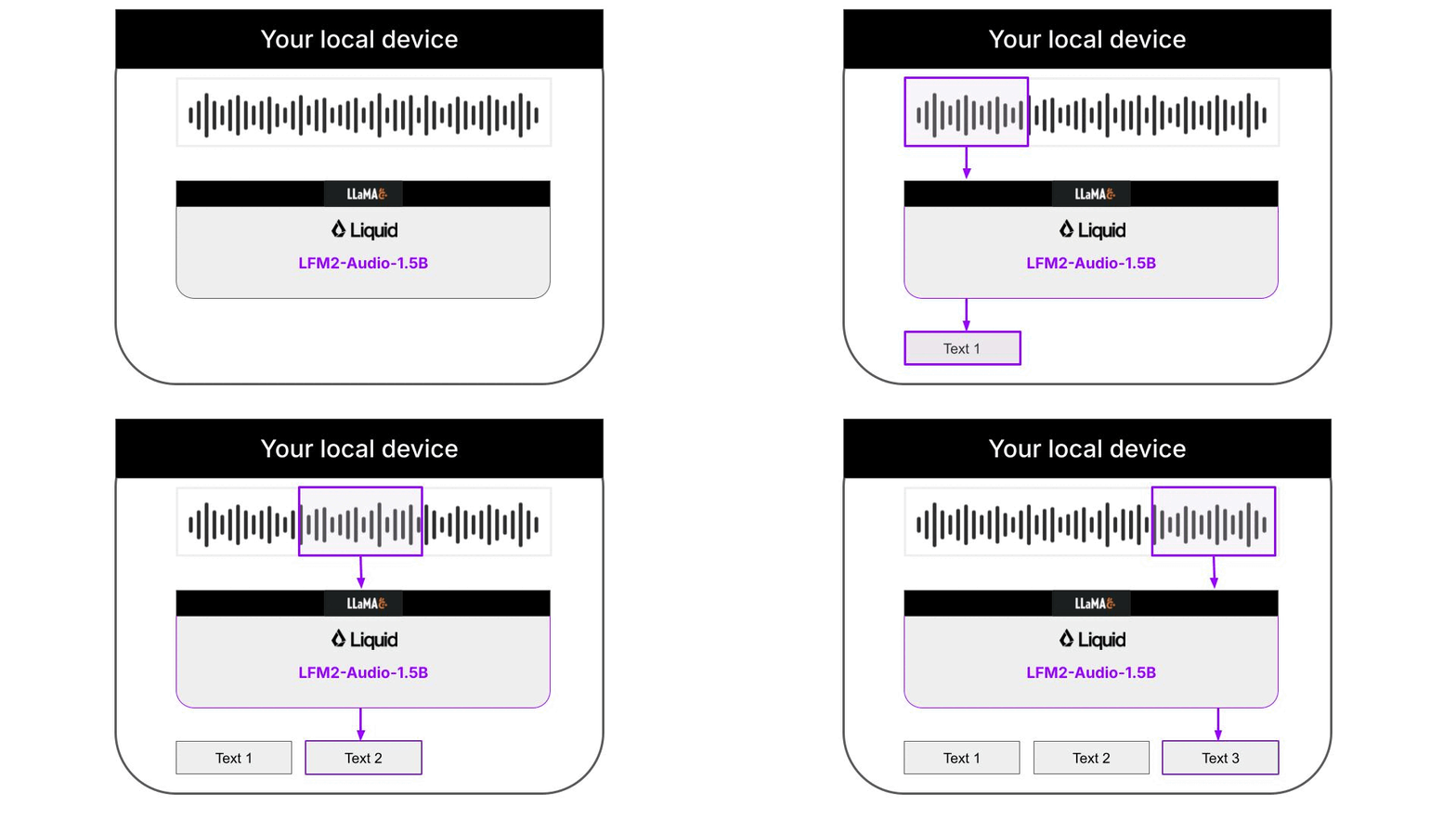 The Python code downloads the necessary llama.cpp builds for your platform automatically, so you don’t need to worry about it. Audio support in llama.cpp is still quite experimental, and not fully integrated on the main branch of the llama.cpp project. Because of this, the Liquid AI team has released specialized llama.cpp builds that support the LFM2.5-Audio-1.5B model, that you will need to run this CLI.
Supported PlatformsThe following platforms are currently supported:
- android-arm64
- macos-arm64
- ubuntu-arm64
- ubuntu-x64
llama.cpp support for audio models
llama.cpp is a super fast and lightweight open-source inference engine for Language Models. It is written in C++ and can be used to run LLMs on your local machine. For example, our Python CLI used llama.cpp under the hood to deliver fast transcriptions, instead of using eitherPyTorch or the higher-level transformers library.
In the examples.sh script you will find 3 examples on how to run inference with LFM2.5-Audio-1.5B for 3 common use cases:
-
Audio to text transcription. This is essentially what our Python CLI does under the hood:
-
Text to speech.
-
Text to speech with a different voice. The supported voices are
US male,UK male,US femaleandUK female.
Further improvements
The decoded text is not perfect, due to overlapping chunk and partial sentences that are grammatically incorrect. To improve the transcription, we can use a text cleaning model to clean the text, in a local 2-step workflow for real-time Audio to Speech recognition. For example, we can use- LFM2.5-Audio-1.5B for audio to text extraction
- LFM2.5-350M for text cleaning
What is LFM2.5-350M?
LFM2.5-350M is a small text-to-text model that can be used for tasks like text cleaning. To achieve optimal performance for your particular use case, you need to optimize your system and user prompts.Need help?
Join our Discord
Connect with the community and ask questions about this example.