

View Source Code
Browse the complete example on GitHub
- Sentinel-2 satellite images
- LFM2.5-VL-450M, a compact Vision-Language Model running directly on the satellite, so inference happens in orbit and only a lightweight JSON payload is downlinked to Earth.
Steps
1. Problem framing
We want to reduce the number of wildfires by identifying areas with high risk from Sentinel-2 images, and providing actionable feedback to local authorities like firefighters so they can act before the fire has even started.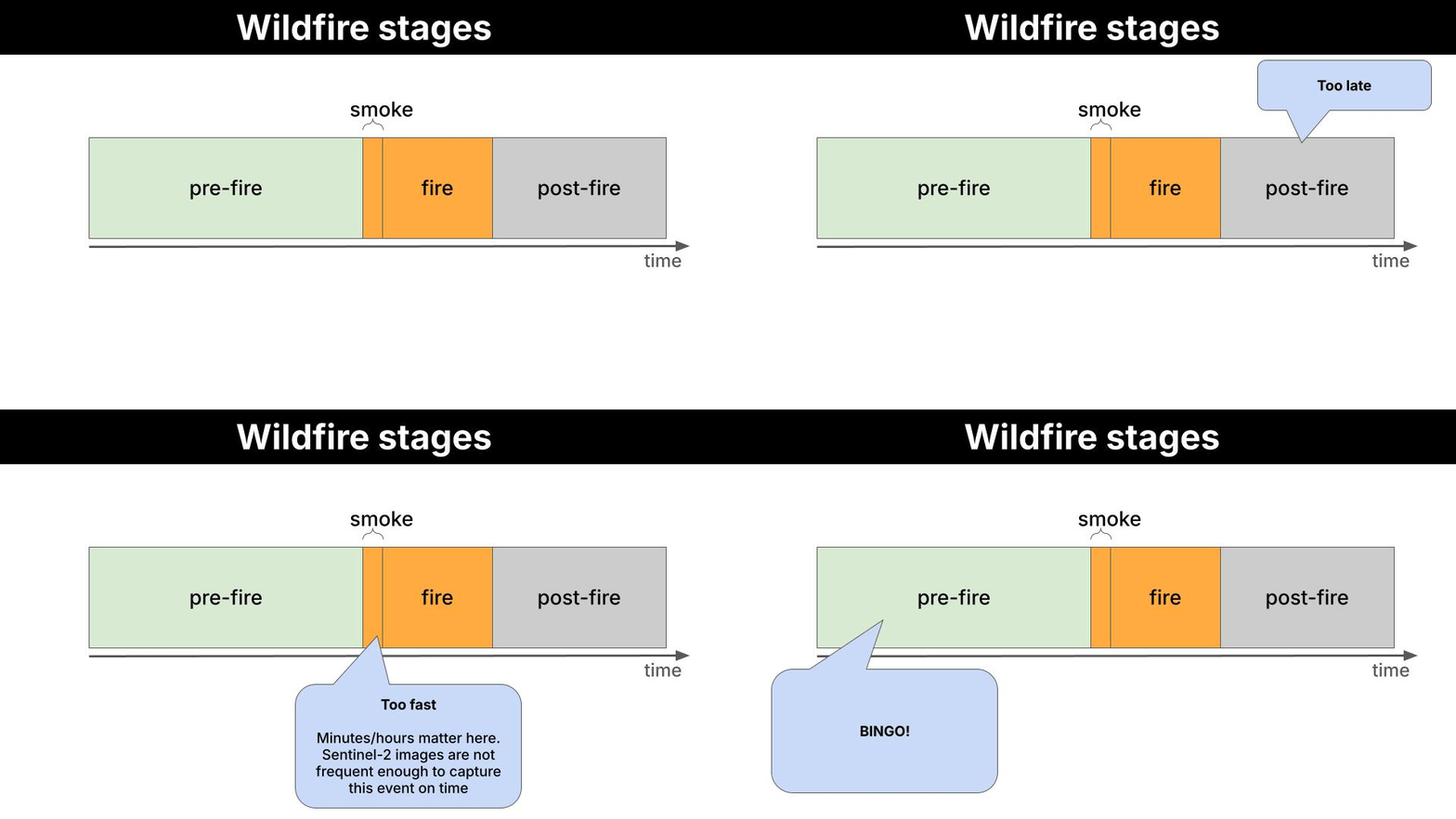
What is Sentinel-2?Sentinel-2 is a European Space Agency (ESA) satellite mission that captures high-resolution optical imagery of Earth’s surface. It’s part of the EU’s Copernicus programme.It consists of 3 satellites (Sentinel-2A, 2B and 2C) which orbit in tandem, revisiting the same location every 5 days at the equator (more frequently at higher latitudes), and capturing multispectral images across 13 discrete wavelength ranges simultaneously. Each range is called a band, and each band carries information about vegetation health, water content, soil moisture, or atmospheric conditions that is not visible to the naked eye.
- RGB (B4-B3-B2): natural color. Useful for reading urban texture, terrain shape from shadows, and water bodies.
- SWIR (B12-B8-B4): shortwave infrared. Highlights vegetation moisture stress and dryness, the primary fuel indicator.
Example
-
A Sentinel-2 satellite flies over Attica (Greece) on 2024-08-01 and takes these 2 pictures.
RGB SWIR 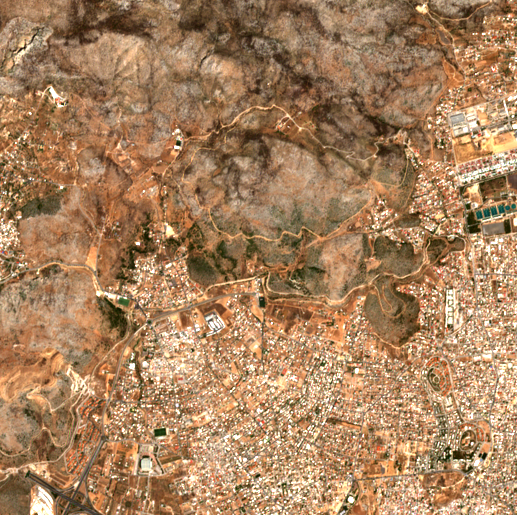
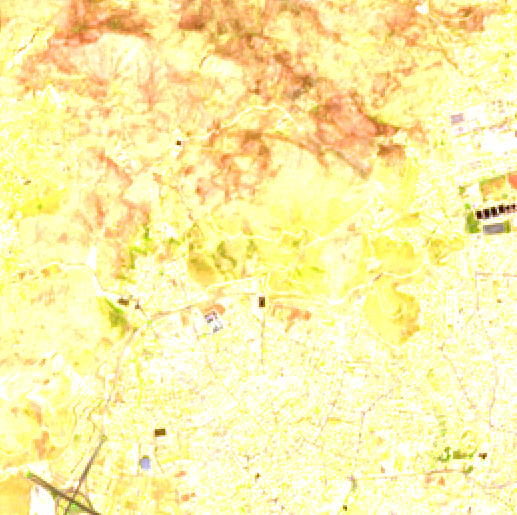
Attica, Greece. 2024-08-01 Attica, Greece. 2024-08-01 -
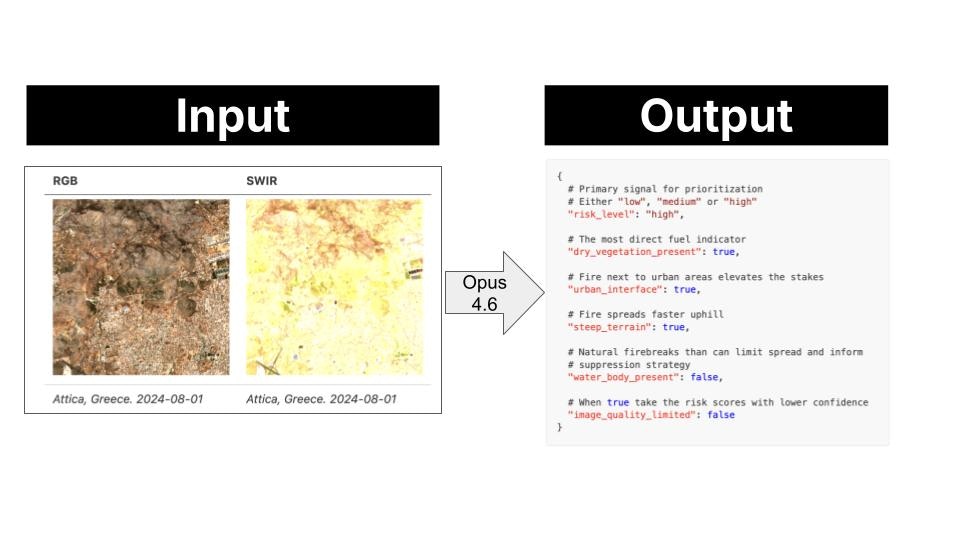
This image pair is passed to the Vision-Language Model, which has holistic scene understanding, not just pixel-level statistics, and the model extracts the following risk profile.
- This payload is downlinked to ground control on Earth. As the image tile has high risk, the system sends an alert to local fire services. These can then take precautionary measures like ground patrol deployment or controlled burns to reduce available fuel.
2. System design
Design rationale
You could point a frontier model (GPT-5, Gemini 2.0 Flash, or Claude 3.6 Sonnet) at satellite images and it would do a good job. So why bother using a smaller one that needs fine-tuning? The bottleneck is not capability. It is data transmission. A frontier model runs on a server on Earth. To use it, the satellite downlinks raw images to a ground station, the ground station feeds the model, and the model produces the output on Earth. Images are high-dimensional: large matrices of pixel values per band, per frame. Multiply that by the number of captures per orbit, and you have a serious bandwidth problem. A small model removes that bottleneck entirely. At 450M parameters, LFM2.5-VL-450M is compact enough to run directly on the satellite: the satellite captures the image and runs inference on-board, the local model produces the payload output in orbit, and only the lightweight output is downlinked to the ground station.Proof of Concept (PoC)
Rather than building a full satellite stack, we simulate the on-board pipeline locally using three components:- SimSat: a local Docker service that simulates a satellite orbit and serves real Sentinel-2 imagery from the AWS Element84 STAC catalog.
predict.py: a lightweight Python watch loop that polls SimSat for the current position, fetches the images, and drives the inference pipeline.- LFM2.5-VL-450M: the local model running via
llama-server, playing the role of the on-board VLM.
Click to see the 22 monitored locations
Click to see the 22 monitored locations
Quickstart
-
Clone the SimSat repository:
-
Start SimSat (keep it running in a separate terminal):
-
Open the SimSat dashboard at
http://localhost:8000, click Start, and verify the satellite position is moving. -
Install Python dependencies:
-
Start the watch loop:
-
Optionally, backfill historical predictions to seed the database before the live loop:
-
Once the database has predictions, launch the app:
3. Data collection and labeling pipeline
We useclaude-opus-4-6 to label a dataset of satellite image pairs.
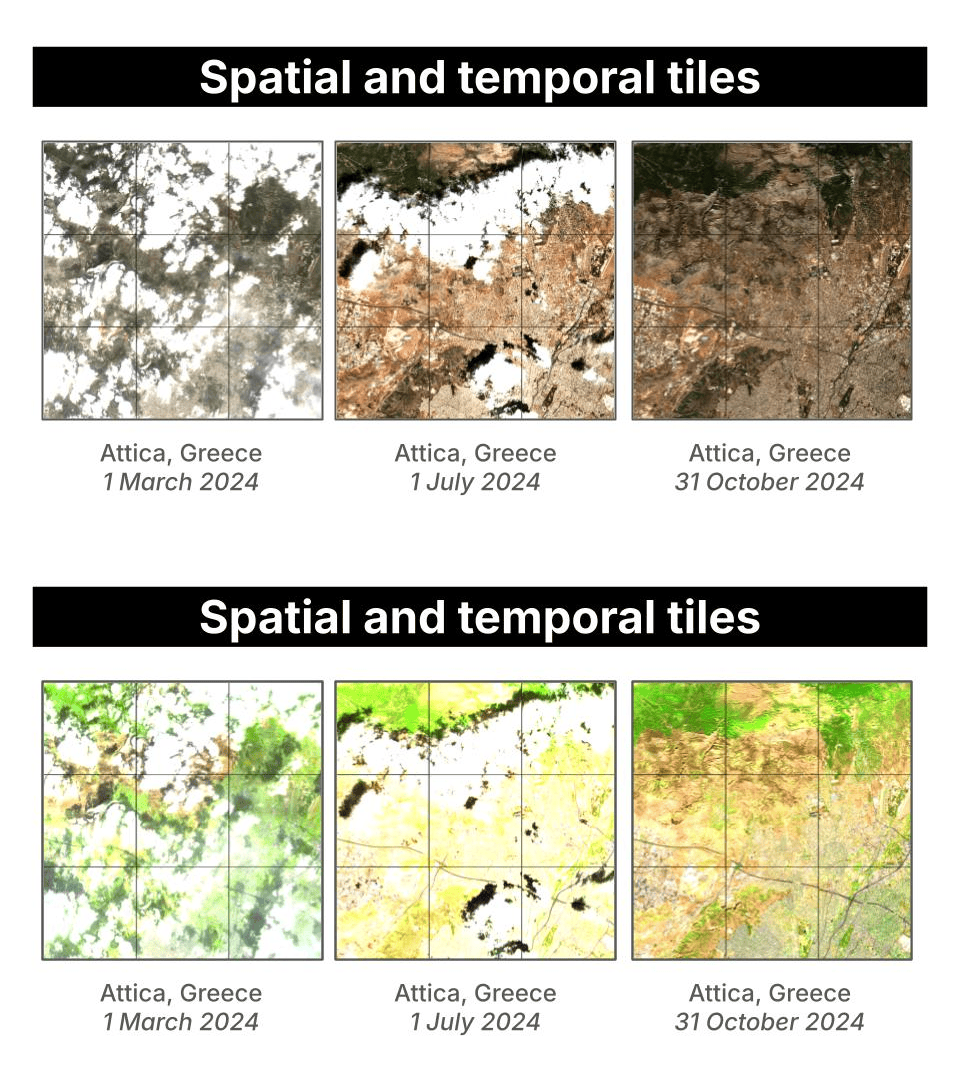
(location, spatial tile, timestamp) triple, generate_samples.py does the following:
- Creates a timestamped run directory under
data/(e.g.,data/20260416_143052/). - Samples
--n-temporal-tilestimestamps evenly spaced within[--start-date, --end-date]using bin-center placement, so timestamps are always in the interior of the window. - Builds a centered square grid of
--n-spatial-tilestiles around each location center, spaced--size-kmapart. - Fetches the RGB and SWIR images in parallel from SimSat for each
(spatial tile, timestamp)pair. - Saves
rgb.pngandswir.pngto the tile subfolder. - Sends both images to
claude-opus-4-6for risk annotation, with automatic retry on rate-limit errors. - Saves the structured JSON output as
annotation.json. - Assigns the tile to
train/ortest/based on a temporal cutoff. This prevents near-duplicate images (Sentinel-2 revisits every 5 days) from appearing on both sides of the split.
4. Evaluation
The evaluation pipeline runs a model against a generated dataset and measures how closely its predictions match the Opus-generated ground truth annotations.evals/{timestamp}/:
report.md: human-readable accuracy tableresults.json: per-sample records with the model’s actual predictions, ground truth, and per-field match resultsmeta.json: run metadata (model, dataset, backend, split)
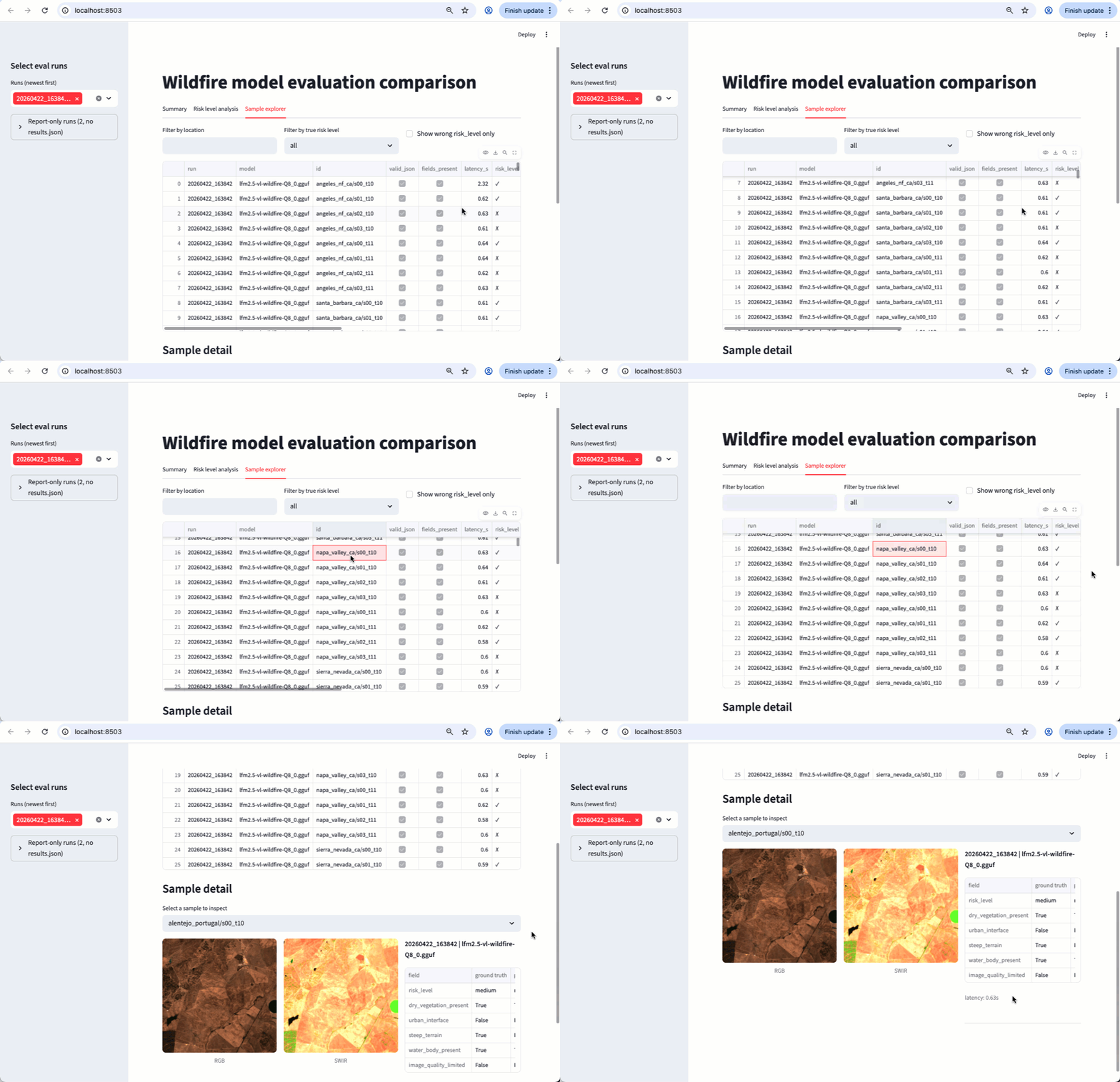
Results
Evaluated on 22 locations (Paulescu/wildfire-prevention), ground truth fromclaude-opus-4-6:
claude-opus-4-6scores 0.99 overall, near-perfect across all fields. The result is not 100% due to non-determinism in token sampling.- The base LFM2.5-VL-450M scores 0.38 overall: it produces valid JSON reliably but struggles with field accuracy, especially
risk_level(0.08) andurban_interface(0.25). This is expected for a zero-shot compact model on a specialized task. Fine-tuning addresses this gap.
5. Fine-tuning
We use liquid-finetune to fine-tuneLFM2.5-VL-450M on the Opus-labeled dataset via Modal’s serverless H100 infrastructure.
Step 1. Install liquid-finetune
Clone liquid-finetune inside the project directory and install its dependencies:Step 2. Prepare the dataset
Prepare the dataset and push it to a Modal volume:--modal flag spins up a Modal container, downloads the dataset from Hugging Face, converts it to JSONL, and writes everything to a Modal volume named wildfire-prevention. The volume is then used directly by the training job in the next step.
Step 3. Prepare the configuration file
This YAML file is the only file you need to pass to liquid-finetune. You can find plenty of examples for different tasks in the liquid-finetune repository.- Full fine-tuning, not LoRA (
use_peft: false): we update both the multimodal projector and the full language model backbone. Satellite imagery is severely underrepresented in standard VLM pretraining data, so the projector needs to genuinely re-learn how to map multispectral patches into meaningful tokens. At 450M parameters, full fine-tuning fits on a single H100 without the memory pressure that motivates LoRA on larger models. - Modal section: the
modalblock tells liquid-finetune to run the training job on Modal’s serverless GPU platform rather than locally. It specifies the GPU type (H100:1), a timeout, and the Modal volume where the prepared dataset lives and where checkpoints are written.
Step 4. Kick off the fine-tuning
Once the configuration YAML file is ready, fine-tuning is as easy as running:Step 5. Retrieve the checkpoint
Step 6. Quantize the model to GGUF
Running inference with a VLM requires two GGUF files. The following script produces both from a single command:--outputsets the backbone path: the language model weights, quantized to Q8_0 by default.- The mmproj (
mmproj-lfm2.5-vl-wildfire-Q8_0.gguf) is written automatically to the same directory, withmmproj-prepended. It contains the vision tower and multimodal projector weights (always F16).
--quant Q4_K_M (or Q4_0, Q5_K_M, Q6_K, F16). The mmproj is always F16 regardless of --quant.
Step 7. (Optional) Push the GGUF pair to Hugging Face
Step 8. Evaluate the fine-tuned model
Results
Evaluated on 172 test samples (Paulescu/wildfire-prevention), ground truth fromclaude-opus-4-6. Fine-tuning takes the model from 0.38 to 0.84 overall accuracy, more than doubling performance. The largest gains are on risk_level (0.08 → 0.76), urban_interface (0.25 → 0.93), and image_quality_limited (0.28 → 0.86).
Need help?
Join our Discord
Connect with the community and ask questions about this example.